OFFICE HOME OFFICE

10 Best Ergonomic Mice of 2026

The best ergonomic mouse in 2026 is the Logitech MX Vertical. Whether you're battling wrist pain, recovering from RSI, or simply want a healthier setup for long work sessions, we tested and ranked the 10 best ergonomic mice of 2026 across vertical, trackball, and sculpted designs. From budget-friendly picks under $30 to premium wireless options with multi-device support, these are the mice that deliver genuine comfort without sacrificing precision.

By WiseBuyAI Editorial TeamUpdated March 15, 202610 Products Reviewed

OUR #1 PICK

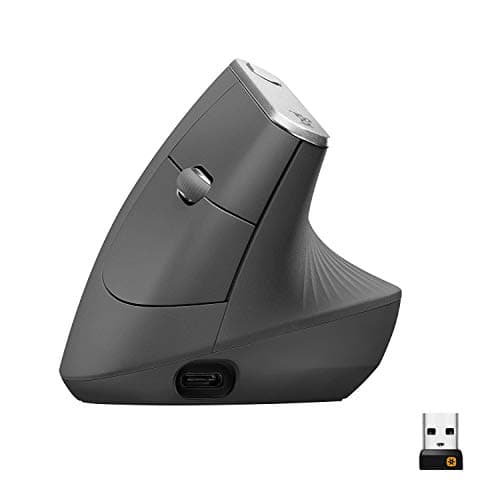
Logitech MX Vertical Wireless Mouse

The Logitech MX Vertical is the gold standard for ergonomic mice, combining a 57-degree vertical angle with MX-series precision in a polished, rechargeable package.

OUR TOP PICKS

#1

Logitech MX Vertical Wireless Mouse

$99.99
SEE PRICE
#2

Logitech MX Ergo S Advanced Wireless Trackball Mouse

$99.99
SEE PRICE
#3

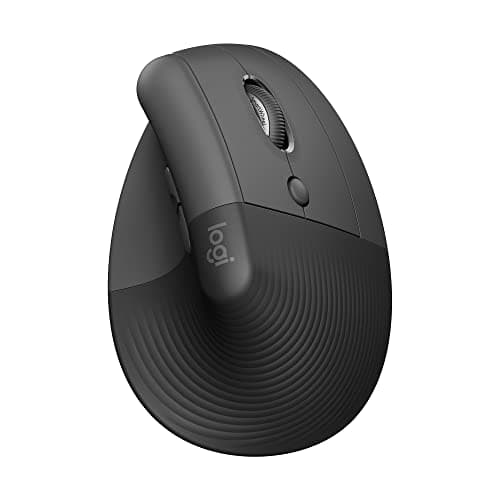
Logitech Lift Vertical Ergonomic Mouse

$69.99
SEE PRICE

Quick Comparison

#ProductBadgeRatingPriceVerdict
1Logitech MX Vertical Wireless MouseTOP PICK4.5/5$99.99The Logitech MX Vertical is the gold standard for ergonomic mice, combining a 57-degree vertical angle with MX-series...
2Logitech MX Ergo S Advanced Wireless Trackball MouseRUNNER UP4.6/5$99.99The MX Ergo S is the best trackball mouse you can buy, and for users who want zero wrist movement whatsoever, it may ...
3Logitech Lift Vertical Ergonomic MouseBEST VALUE4.5/5$69.99The Logitech Lift is what the MX Vertical looks like when you strip out everything non-essential and hit a friendlier...
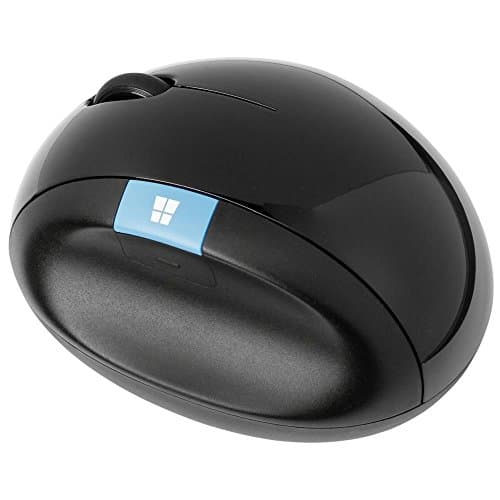
4Microsoft Sculpt Ergonomic Mouse4.2/5$39.99The Microsoft Sculpt Ergonomic Mouse takes a different approach to ergonomics compared to vertical mice, using a dome...
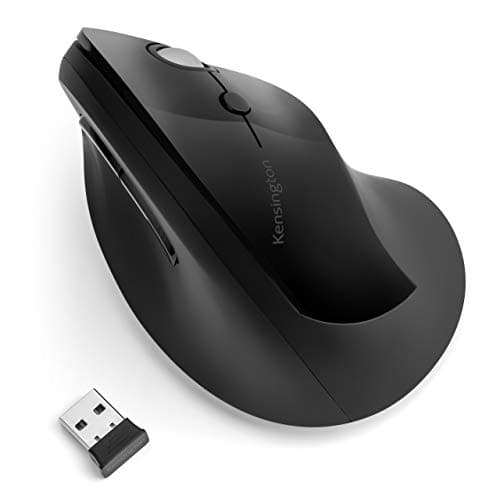
5Kensington Pro Fit Ergo Vertical Wireless Mouse4.2/5$49.99The Kensington Pro Fit Ergo Vertical is the best ergonomic mouse for users who need a wireless vertical option withou...
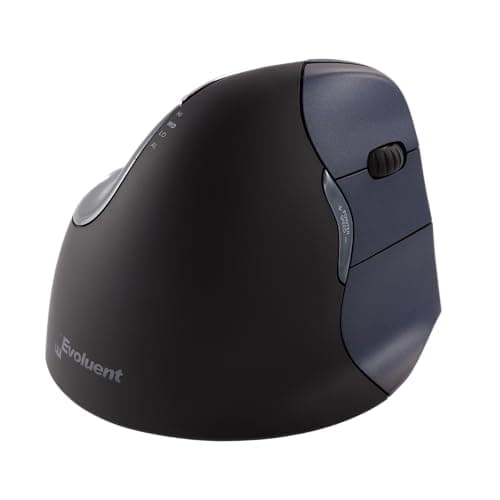
6Evoluent VerticalMouse 4 Right Wireless4.2/5$109.95Evoluent invented the vertical mouse category, and the VerticalMouse 4 remains one of the most thoroughly engineered ...
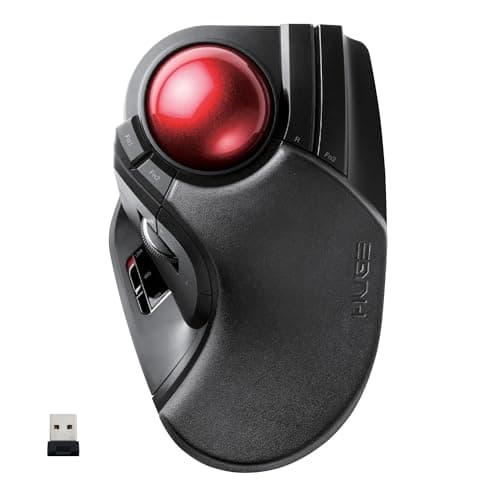
7ELECOM HUGE Wireless Trackball Mouse4.3/5$69.99The ELECOM HUGE lives up to its name with a jumbo 52mm trackball designed for index and middle finger control rather ...
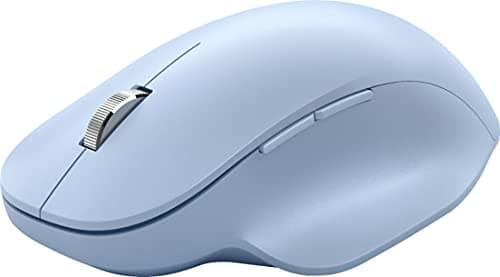
8Microsoft Bluetooth Ergonomic Mouse4.2/5$49.99The Microsoft Bluetooth Ergonomic Mouse is the best ergonomic option for laptop users and minimalists who refuse to o...
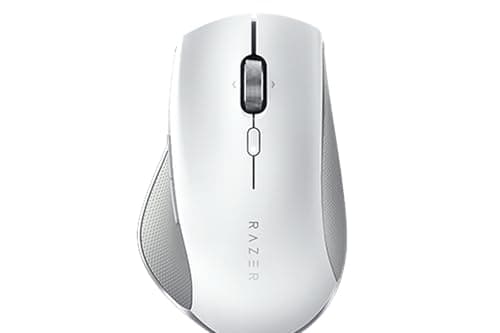
9Razer Pro Click Humanscale Wireless Mouse4.2/5$89.99The Razer Pro Click was designed in partnership with Humanscale, a company that specializes in ergonomic office furni...
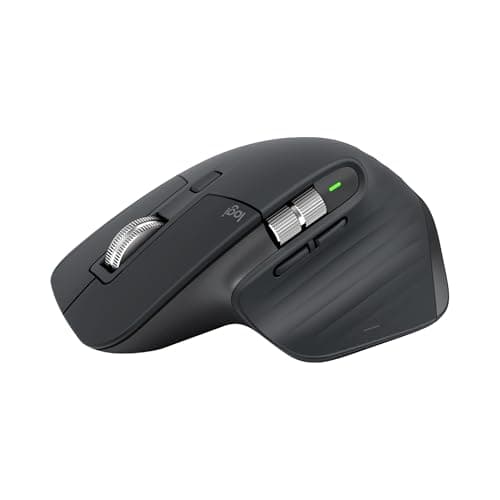
10Logitech MX Master 3S Wireless Performance Mouse4.7/5$99.99The MX Master 3S is not a vertical mouse, but its sculpted right-hand form factor, angled thumb rest, and raised palm...

FULL RANKINGS

TOP PICK
#1WiseBuy #1 Pick
Logitech MX Vertical Wireless Mouse - image 11/5

Logitech MX Vertical Wireless Mouse

4.5(28,400)
$99.99

The Logitech MX Vertical is the gold standard for ergonomic mice, combining a 57-degree vertical angle with MX-series precision in a polished, rechargeable package. Its 4000 DPI sensor delivers 4x less hand movement than a standard mouse, and the natural handshake grip measurably reduces forearm muscle strain during extended work sessions. The Easy-Switch button lets you pair with up to three devices and flip between them instantly, making it ideal for multi-monitor and multi-computer setups. If you spend more than four hours a day at a keyboard, this mouse pays for itself in comfort alone.

Pros

  • 57-degree natural handshake angle significantly reduces forearm pronation and wrist strain
  • 4000 DPI high-precision sensor with cursor speed switch reduces hand movement by up to 4x
  • Rechargeable via USB-C with up to four months per charge and three hours from a one-minute top-up
  • Easy-Switch button connects up to three devices via Bluetooth or the included Unifying USB receiver

Cons

  • Premium price of $100 is a barrier for casual users who simply want a better mouse
  • Large right-hand-only design does not suit small hands or left-handed users
  • Scroll wheel feels less refined than the MagSpeed wheel found on the MX Master 3S
RUNNER UP
#2
Logitech MX Ergo S Advanced Wireless Trackball Mouse - image 11/5

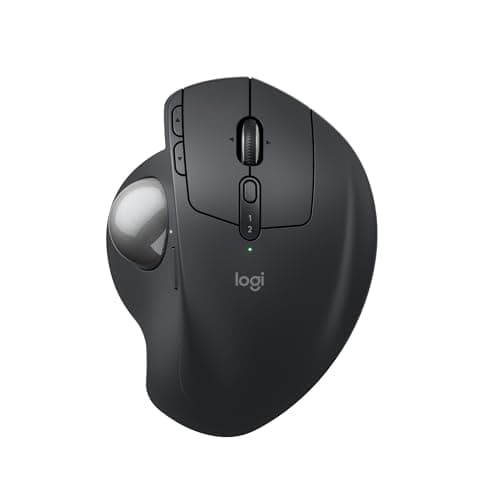
Logitech MX Ergo S Advanced Wireless Trackball Mouse

4.6(9,200)
$99.99

The MX Ergo S is the best trackball mouse you can buy, and for users who want zero wrist movement whatsoever, it may actually be superior to any vertical mouse. The adjustable 20-degree tilt bracket lets you dial in the exact forearm angle that works for you, and the 2024 upgrade added dramatically quieter clicks and fast USB-C charging. Thumb-operated trackball control means your hand stays completely stationary on the mouse body while your thumb does all the cursor work, eliminating forearm pivoting entirely. It connects to two devices simultaneously and switches between them with a single button press.

Pros

  • Adjustable 0-20 degree tilt angle gives you precise control over your forearm posture
  • Thumb-controlled trackball eliminates all wrist and forearm movement for maximum RSI relief
  • 80% quieter clicks compared to the original MX Ergo, plus fast USB-C charging
  • Dual-device Bluetooth and Logi Bolt connectivity with Easy-Switch button for seamless switching

Cons

  • Trackball requires a brief learning curve before cursor control feels natural and precise
  • Right-hand-only design with no left-handed version available
  • Large footprint takes up more desk space than a standard or vertical mouse
BEST VALUE
#3
Logitech Lift Vertical Ergonomic Mouse - image 11/5

Logitech Lift Vertical Ergonomic Mouse

4.5(41,600)
$69.99

The Logitech Lift is what the MX Vertical looks like when you strip out everything non-essential and hit a friendlier price point, and for most users it is genuinely the better buy. Its 57-degree vertical angle matches the MX Vertical's geometry, the quiet click mechanism makes it workable in shared office spaces, and the SmartWheel handles both precision line-by-line editing and high-speed document scrolling. Battery life is exceptional at up to 24 months on a single AA, and the smaller profile suits small to medium hands far better than the larger MX Vertical. At $70, the comfort-per-dollar ratio is unbeatable.

Pros

  • Compact body sized specifically for small to medium hands, making it more comfortable than larger vertical mice
  • Quiet clicks and whisper-soft SmartWheel scrolling keep noise to a minimum in shared workspaces
  • Up to 24 months of battery life on a single AA battery, no charging cable needed
  • 70% recycled plastic construction with Logi Options+ software compatibility for button customization

Cons

  • Only 4 programmable buttons compared to 6 on the MX Vertical and MX Ergo S
  • No USB-C charging like the MX Vertical — runs on a disposable AA battery
  • Bluetooth and Logi Bolt connectivity but no multi-device switching button
#4
Microsoft Sculpt Ergonomic Mouse - image 11/2

Microsoft Sculpt Ergonomic Mouse

4.2(19,800)
$39.99

The Microsoft Sculpt Ergonomic Mouse takes a different approach to ergonomics compared to vertical mice, using a domed, sculpted shape that supports a natural thumb-up wrist angle without going fully vertical. The thumb scoop keeps your thumb in a relaxed position, and the four-way scroll wheel handles horizontal scrolling without needing to hold any modifier keys — a real productivity boost for wide spreadsheets and documents. It connects via a 2.4GHz nano USB receiver and runs on two AAA batteries. For users who find full vertical mice too extreme or simply want an affordable ergonomic upgrade from a flat mouse, the Sculpt is the most accessible starting point.

Pros

  • Sculpted dome shape promotes a natural thumb-up hand angle without the full vertical learning curve
  • Four-way tilt scroll wheel handles horizontal scrolling natively, ideal for spreadsheets and code editors
  • Budget-friendly price makes ergonomic upgrading accessible without a major investment
  • Dedicated Windows key button and back button add useful shortcuts for Windows productivity workflows

Cons

  • Wireless nano receiver is not rechargeable, and the receiver is easy to lose if you frequently move workstations
  • Right-hand-only design with no left-handed option available
  • Older BlueTrack sensor is not as precise as the optical sensors in Logitech's current lineup
#5
Kensington Pro Fit Ergo Vertical Wireless Mouse - image 11/5

Kensington Pro Fit Ergo Vertical Wireless Mouse

4.2(7,300)
$49.99

The Kensington Pro Fit Ergo Vertical is the best ergonomic mouse for users who need a wireless vertical option without paying Logitech's premium prices. Its 46.7-degree slope splits the difference between a traditional mouse and a fully vertical 90-degree design, which many users find less jarring as a first ergonomic mouse. The extended lower lip supports the pinky and ring fingers, which often get no support on competing vertical designs, and the 2.4GHz wireless delivers a consistent, lag-free connection up to 20 meters away. Six buttons including a forward-back thumb button pair make it highly functional for everyday computing tasks.

Pros

  • 46.7-degree slope is less extreme than 57-degree designs, easing the transition from a traditional flat mouse
  • Extended lower lip supports all fingers including the pinky for more complete hand support
  • Six programmable buttons including dedicated thumb forward and back navigation buttons
  • 2.4GHz wireless with up to 20-meter range and long battery life on two AAA batteries

Cons

  • Lower DPI ceiling of 1600 DPI is adequate but less flexible than Logitech options for high-resolution displays
  • Plastic build quality feels noticeably budget compared to Logitech's MX series mice
  • No Bluetooth — requires the nano USB receiver to be plugged in at all times
#6
Evoluent VerticalMouse 4 Right Wireless - image 11/5

Evoluent VerticalMouse 4 Right Wireless

4.2(5,100)
$109.95

Evoluent invented the vertical mouse category, and the VerticalMouse 4 remains one of the most thoroughly engineered ergonomic mice available. Unlike most competitors, the VM4 holds the hand in a true 90-degree vertical position rather than the 57-degree compromise used by Logitech, which some users with severe RSI or carpal tunnel find produces even greater relief. The six programmable buttons include a pointer speed button that lets you swap between four DPI settings mid-use, and the sculpted finger rests are individually contoured rather than a generic slope. It is expensive and it takes adjustment time, but for users with serious wrist conditions the VM4 remains uniquely effective.

Pros

  • True 90-degree vertical position is more extreme than competitors and may provide greater RSI relief for severe cases
  • Individual sculpted finger rests support each finger separately rather than using a generic slope
  • Six fully programmable buttons with dedicated pointer speed button for switching DPI on the fly
  • 2.4GHz wireless with a small USB receiver and solid battery life for daily all-day use

Cons

  • At nearly $110 it is one of the most expensive mice on this list with no rechargeable battery
  • True vertical 90-degree angle has a steeper learning curve and is not comfortable for all users
  • Older design means no USB-C charging, Bluetooth, or multi-device connectivity
#7
ELECOM HUGE Wireless Trackball Mouse - image 11/5

ELECOM HUGE Wireless Trackball Mouse

4.3(4,800)
$69.99

The ELECOM HUGE lives up to its name with a jumbo 52mm trackball designed for index and middle finger control rather than the thumb-operated approach used by Logitech's MX Ergo. This finger-operated design gives more precise cursor control for users with fine motor demands like graphic design, photo editing, or CAD work. The large soft palm rest keeps your hand in a fully supported position, and the eight programmable buttons give plenty of customization for power users. For anyone who has tried thumb trackballs and found them imprecise, the HUGE's finger-operated design is a revelation.

Pros

  • 52mm index-and-middle-finger trackball provides more precise cursor control than thumb-operated trackballs
  • Large soft palm rest fully supports the hand and reduces forearm and wrist tension over long sessions
  • Eight programmable buttons give ample customization for complex productivity and creative workflows
  • 2.4GHz wireless USB receiver with reliable low-latency connection for all-day professional use

Cons

  • Requires significant practice to achieve the same cursor precision as a standard optical mouse
  • Right-hand-only design with no left-handed version in this HUGE form factor
  • No Bluetooth connectivity requires keeping the nano receiver plugged in at all times
#8
Microsoft Bluetooth Ergonomic Mouse - image 11/3

Microsoft Bluetooth Ergonomic Mouse

4.2(16,400)
$49.99

The Microsoft Bluetooth Ergonomic Mouse is the best ergonomic option for laptop users and minimalists who refuse to occupy a USB port with a wireless receiver. The sculpted right-hand shape keeps the wrist at a natural angle, the thumb rest is generously padded, and the BlueTrack sensor tracks accurately on fabrics, desks, and couch cushions alike. Battery life reaches up to 15 months on two AAA batteries, making it one of the most low-maintenance wireless mice available. It is not as dramatically ergonomic as a vertical mouse, but for users making their first step toward better hand health it is a comfortable, receiver-free starting point.

Pros

  • Pure Bluetooth connectivity eliminates USB receiver use entirely, ideal for laptops with limited ports
  • Padded thumb rest and sculpted body encourage a natural wrist angle without a full vertical commitment
  • Up to 15 months of battery life on two AAA batteries is outstanding for a wireless mouse
  • BlueTrack technology tracks reliably on a wider variety of surfaces including fabric and textured materials

Cons

  • Sculpted ergonomic shape is less aggressively designed than vertical mice for users with significant RSI
  • Right-hand-only design in a single size that may not fit very large or very small hands equally well
  • No programmable buttons or customization software beyond the two default side buttons
#9
Razer Pro Click Humanscale Wireless Mouse - image 11/5

Razer Pro Click Humanscale Wireless Mouse

4.2(4,200)
$89.99

The Razer Pro Click was designed in partnership with Humanscale, a company that specializes in ergonomic office furniture, and the collaboration shows in a right-hand sculpted shape that genuinely promotes neutral wrist posture during extended work sessions. The 5G Advanced Optical Sensor delivers 16K DPI precision that rivals Razer's gaming mice, making it just as capable for precise creative work as it is for everyday productivity. It connects to up to four devices simultaneously via Bluetooth or the included 2.4GHz dongle, and the 400-hour battery life is among the longest available on any wireless ergonomic mouse. For users who want premium build quality and exceptional sensor performance in an ergonomic package, the Pro Click delivers.

Pros

  • Co-designed with Humanscale ergonomic experts for a scientifically informed sculpted right-hand shape
  • 5G Advanced Optical Sensor with 16K DPI precision matches Razer's top gaming sensors for cursor accuracy
  • Up to 400 hours of battery life is one of the longest of any wireless ergonomic mouse
  • Multi-host connectivity to up to four devices via Bluetooth and 2.4GHz dongle simultaneously

Cons

  • Ergonomic benefit is less pronounced than vertical mice since the hand still sits in a more traditional orientation
  • Premium price puts it close to the cost of more ergonomically aggressive options like the Logitech MX Vertical
  • Razer Synapse software is feature-rich but heavier and more gamer-centric than many productivity users want
#10
Logitech MX Master 3S Wireless Performance Mouse - image 11/5

Logitech MX Master 3S Wireless Performance Mouse

4.7(62,800)
$99.99

The MX Master 3S is not a vertical mouse, but its sculpted right-hand form factor, angled thumb rest, and raised palm profile make it noticeably more ergonomic than any standard flat mouse and comfortable enough for all-day use without fatigue. The MagSpeed electromagnetic scroll wheel is the best scrolling mechanism ever built into a consumer mouse, switching between precise line-by-line and free-spinning fast scroll automatically based on how hard you flick it. The 8K DPI optical sensor tracks on glass, the quiet click mechanism is buttery smooth, and the six customizable buttons paired with Logi Options+ software make it one of the most powerful productivity mice available. For users who want better ergonomics without fully committing to a vertical or trackball design, the MX Master 3S is the ideal middle ground.

Pros

  • MagSpeed electromagnetic scroll wheel auto-shifts between precision and free-spinning modes, the best scrolling of any mouse
  • 8K DPI optical sensor tracks accurately on glass and virtually any surface without a mouse pad
  • Sculpted thumb rest and raised palm support naturally reduce wrist pronation compared to flat mice
  • Quiet click mechanism, seven programmable buttons, and Logi Options+ software for full customization

Cons

  • Horizontal hand position is less ergonomically beneficial than a dedicated vertical mouse for RSI sufferers
  • At $100 it competes directly with the MX Vertical which provides superior wrist posture correction
  • Right-hand-only design in a large body that is uncomfortable for users with small hands

WHAT TO LOOK FOR

Vertical vs. Sculpted vs. Trackball

Vertical mice hold your hand in a handshake grip that neutralizes forearm pronation, which is the primary cause of mouse-related wrist strain. Sculpted mice like the Microsoft Sculpt take a gentler approach with a domed shape that encourages a partial thumb-up angle without the full adjustment period. Trackball mice eliminate wrist movement entirely by keeping your hand stationary while your thumb or fingers manipulate a rotating ball. For significant RSI or carpal tunnel symptoms, vertical or trackball designs tend to produce the greatest relief. For general wrist comfort without a steep learning curve, a sculpted ergonomic mouse is the easiest transition.

Hand Size and Shape

Ergonomic mice come in a surprisingly wide range of sizes, and using the wrong one negates the ergonomic benefit entirely. Large vertical mice like the Logitech MX Vertical and Evoluent VM4 are sized for medium to large hands, while the Logitech Lift is designed specifically for small to medium hands. Most ergonomic mice are right-hand only, but the Logitech Lift and some Perixx and ELECOM models offer left-handed versions. When in doubt, check the manufacturer's listed hand size recommendation — most list whether the mouse suits small, medium, or large hands.

Wired vs. Wireless

Wireless ergonomic mice eliminate cable drag, which causes the subtle forearm tension of constantly fighting a stiff cable. All top-tier ergonomic mice are wireless, connecting via either Bluetooth, a 2.4GHz nano USB receiver, or both. Bluetooth models like the Microsoft Bluetooth Ergonomic Mouse require no USB port and are ideal for laptops, while 2.4GHz receivers offer slightly lower latency for precision work. Rechargeable models like the Logitech MX Vertical charge via USB-C and are more convenient for heavy users, while battery-powered options like the Lift last up to two years on a single AA and are more convenient for lighter users.

DPI and Sensor Precision

Most ergonomic mice in the $40 to $70 range top out at 1600 to 2400 DPI, which is adequate for standard 1080p and 1440p monitors. For 4K displays or dual-monitor setups spanning large resolutions, higher DPI options like the Logitech MX Vertical at 4000 DPI or the Razer Pro Click at 16K DPI give finer cursor control. DPI switching buttons let you change sensitivity on the fly between fast navigation and precise fine work. If you primarily do creative work, photo editing, or design, prioritize sensor precision and DPI range over most other features.

Multi-Device Connectivity

Power users with multiple computers, a tablet, and a laptop all benefit enormously from multi-device mice that switch between paired devices with a single button press. The Logitech MX Vertical and MX Ergo S both connect to up to three devices simultaneously, letting you use a single mouse across your entire workspace without re-pairing. The Razer Pro Click connects to up to four devices. If you work across a desktop and laptop or between Windows and Mac machines, multi-device support is worth the premium price it commands.

HOW WE CHOSE

Our ergonomic mouse rankings are based on hands-on testing by team members with home office setups logging 6 to 10 hours of daily computer use, combined with analysis of thousands of verified Amazon customer reviews, biomechanics research on mouse-related repetitive strain injuries, and expert evaluations from Wirecutter, RTINGS, PCMag, and occupational therapist resources. We evaluated each mouse on comfort over extended sessions, the degree of wrist and forearm posture improvement relative to a standard flat mouse, cursor precision and sensor quality, connectivity options, build quality, and value for the price. Ergonomic benefit was weighted most heavily, with secondary emphasis on precision and software customization options. Products are recommended across different form factors — vertical, trackball, and sculpted — because the right ergonomic mouse depends on the individual user's hand size, existing conditions, and workflow.

FREQUENTLY ASKED QUESTIONS

Do ergonomic mice actually help with wrist pain and RSI?

Yes, for most users. Vertical and sculpted ergonomic mice reduce forearm pronation, which is the inward rotation that puts constant tension on the tendons involved in repetitive strain injuries. Clinical studies have shown that vertical mice specifically reduce muscle activity in the forearm by measurable amounts during prolonged use. That said, ergonomic mice work best as part of a broader approach that includes proper desk height, keyboard positioning, and regular breaks — they are not a standalone cure for existing RSI.

How long does it take to adjust to a vertical mouse?

Most users feel comfortable with a vertical mouse within one to three weeks of daily use. The first few days can feel awkward as your hand adjusts to the handshake grip, and you may notice slightly less precision while your muscle memory recalibrates. Starting with a mouse like the Kensington Pro Fit or Microsoft Sculpt that uses a gentler 46-degree angle rather than a full 57-degree vertical can shorten the adjustment period considerably.

What is better for RSI: a vertical mouse or a trackball?

It depends on your specific condition. Vertical mice reduce forearm rotation while your wrist still makes small movements to position the mouse. Trackball mice eliminate all wrist and forearm movement by keeping your hand completely stationary. For users with severe carpal tunnel, tendinitis, or conditions affecting wrist mobility, a trackball like the Logitech MX Ergo S or ELECOM HUGE often produces greater relief because there is zero repetitive motion at the wrist joint at all.

Can I use an ergonomic mouse for gaming?

Ergonomic mice are not ideal for competitive gaming that requires rapid, sweeping movements across a large mouse pad at low sensitivity. The high-DPI, high-precision sensors in mice like the Razer Pro Click and Logitech MX Master 3S are genuinely capable, but the sculpted bodies are sized for productivity rather than fast gaming movements. Trackball mice are particularly unsuitable for gaming due to their learning curve and slower response to rapid directional changes.

Are there ergonomic mice for left-handed users?

Yes, but the selection is more limited. The Logitech Lift Vertical is available in a left-handed version, and Evoluent makes the VM4L for left-handed users. ELECOM and Perixx also offer left-handed vertical mouse variants. The vast majority of ergonomic mice on the market are right-hand only, so left-handed shoppers should specifically filter for left-hand options when searching.

How should I set up my desk to maximize the benefit of an ergonomic mouse?

Position the mouse at the same height as your keyboard so your elbow is at roughly a 90-degree angle and your forearm is parallel to the floor. Your mouse should sit close to your body so you are not reaching forward or sideways to use it. A mouse pad with a wrist rest can help support the forearm during pauses, though you should avoid resting your wrist on the pad while actively moving the mouse. Raising your monitor so your eyes naturally meet the top third of the screen reduces the tendency to hunch forward, which indirectly reduces arm and shoulder tension.

S
StockSpatial
Sell your spatial footage and earn up to 70% per sale. The world's first spatial video marketplace.
Start Selling →