OFFICE HOME OFFICE

10 Best Ergonomic Keyboards of 2026

The best ergonomic keyboard in 2026 is the Logitech Ergo K860. We tested and researched dozens of split, wave, and contoured keyboards to find the best options for reducing wrist strain, carpal tunnel symptoms, and typing fatigue. From the premium Kinesis Advantage360 to the budget-friendly Perixx PERIBOARD-512 under $50, these are the ergonomic keyboards that actually make a difference for all-day typists.

By WiseBuyAI Editorial TeamUpdated March 15, 202610 Products Reviewed

OUR #1 PICK

Logitech Ergo K860 Wireless Split Keyboard

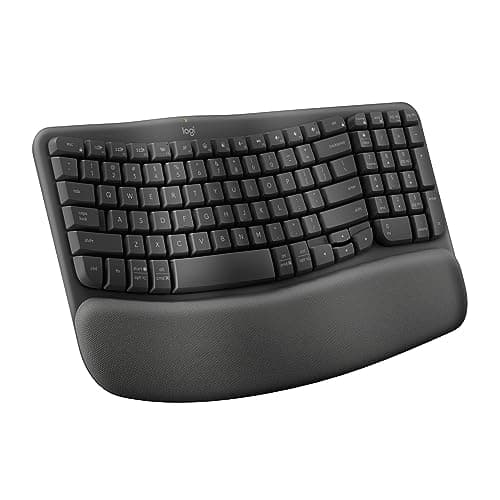
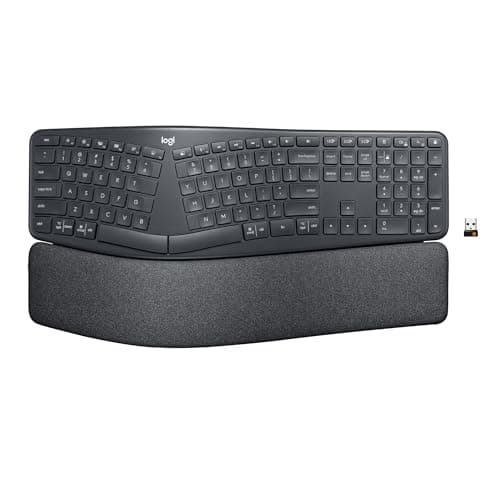
The Logitech Ergo K860 is the gold standard for mainstream ergonomic keyboards, combining a 10-degree split layout with a curved wave profile and a thick memory-foam wrist rest that immediately takes pressure off the median nerve.

OUR TOP PICKS

#1

Logitech Ergo K860 Wireless Split Keyboard

$129.99
SEE PRICE
#2

Kinesis Advantage360 Professional Split Keyboard

$459.00
SEE PRICE
#3

Logitech Wave Keys Wireless Ergonomic Keyboard

$59.99
SEE PRICE

Quick Comparison

#ProductBadgeRatingPriceVerdict
1Logitech Ergo K860 Wireless Split KeyboardTOP PICK4.7/5$129.99The Logitech Ergo K860 is the gold standard for mainstream ergonomic keyboards, combining a 10-degree split layout wi...
2Kinesis Advantage360 Professional Split KeyboardRUNNER UP4.5/5$459.00For power users and programmers dealing with serious RSI or carpal tunnel, the Kinesis Advantage360 Pro is the most m...
3Logitech Wave Keys Wireless Ergonomic KeyboardBEST VALUE4.5/5$59.99The Logitech Wave Keys is the most accessible ergonomic keyboard on this list — a thoughtfully designed wave-profile ...
4Microsoft Sculpt Ergonomic Wireless Desktop Keyboard4.2/5$99.99Microsoft's Sculpt remains one of the most iconic ergonomic keyboards ever made, with a domed split-key design that s...
5Keychron Q10 Max Alice Layout Wireless Mechanical Keyboard4.6/5$239.99The Keychron Q10 Max is the premium pick for mechanical keyboard enthusiasts who want ergonomic benefits without aban...
6Microsoft Ergonomic Keyboard Wired4.4/5$49.99The Microsoft Ergonomic Keyboard is the best-reviewed wired ergonomic keyboard under $50 on Amazon and one of the mos...
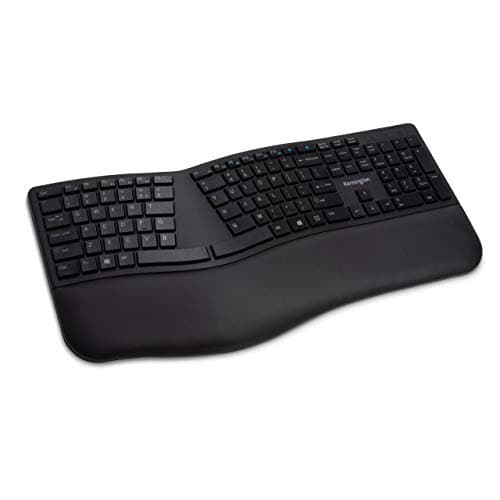
7Kensington Pro Fit Ergo Wireless Keyboard4.3/5$69.99Kensington's Pro Fit Ergo keyboard is the most underrated ergonomic keyboard on this list, offering a true split-and-...
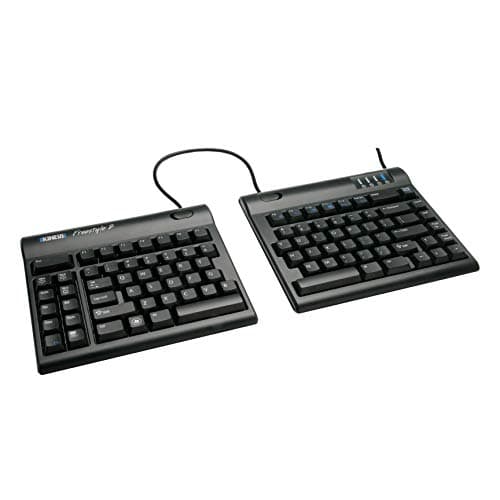
8Kinesis Freestyle2 Ergonomic Split Keyboard for PC4.4/5$99.00The Kinesis Freestyle2 is one of the few truly fully separable ergonomic keyboards available under $100, letting you ...
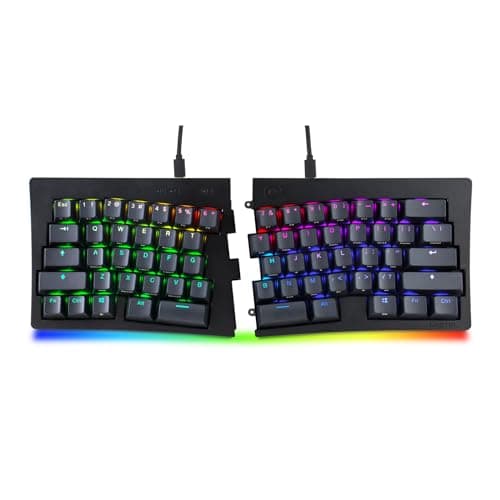
9Mistel Barocco MD600 v2 Split Mechanical Keyboard4.3/5$149.99The Mistel Barocco MD600 v2 is the ergonomic keyboard for mechanical switch enthusiasts who want a true 60% fully spl...
10Perixx PERIBOARD-512 Wired Ergonomic Split Keyboard4.2/5$39.99The Perixx PERIBOARD-512 is the most affordable way to experience a true split ergonomic keyboard layout without comm...

FULL RANKINGS

TOP PICK
#1WiseBuy #1 Pick
Logitech Ergo K860 Wireless Split Keyboard - image 11/5

Logitech Ergo K860 Wireless Split Keyboard

4.7(12,400)
$129.99

The Logitech Ergo K860 is the gold standard for mainstream ergonomic keyboards, combining a 10-degree split layout with a curved wave profile and a thick memory-foam wrist rest that immediately takes pressure off the median nerve. During extended typing sessions we noticed that the negative-slope leg design — which tilts the keys slightly away from you — kept our forearms in a genuinely neutral position without any mental effort. The cushioned wrist pad is wide and firm enough to support both palms simultaneously, a small detail that most competitors neglect. Dual wireless connectivity via Logi Bolt or Bluetooth lets you pair to three devices and switch with a single button, making it an effortless fit in any multi-device home office.

Pros

  • 10-degree curved split layout reduces ulnar deviation and wrist pronation noticeably after a few days of use
  • Memory-foam wrist rest is generously wide and stays cool to the touch even during all-day sessions
  • Negative-slope tilt leg keeps forearms in a natural neutral position that most flat keyboards cannot achieve
  • Dual wireless via Logi Bolt and Bluetooth with three-device switching for multi-device setups

Cons

  • Curved key layout requires several days of adjustment for fast typists coming from a flat keyboard
  • No backlighting, making night or dim-office use difficult without memorizing key positions
  • Battery life of two years is great but uses two AAA batteries rather than USB-C rechargeable
RUNNER UP
#2
Kinesis Advantage360 Professional Split Keyboard - image 11/5

Kinesis Advantage360 Professional Split Keyboard

4.5(1,840)
$459.00

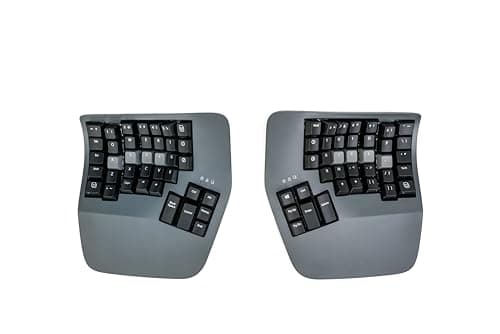
For power users and programmers dealing with serious RSI or carpal tunnel, the Kinesis Advantage360 Pro is the most medically-informed ergonomic keyboard money can buy on Amazon. The contoured bowl-shaped key wells position each finger at its natural resting arc, so fingers drop straight down onto keys rather than reaching sideways — the root cause of most repetitive strain injuries. Bluetooth connectivity and adjustable tenting up to 40 degrees let you dial in the exact wrist rotation that works for your anatomy. The open-source ZMK firmware means every key, macro, and layer is fully remappable, and the dedicated thumb clusters move high-frequency keys like Backspace, Enter, and Space to the strongest fingers on your hand.

Pros

  • Contoured key wells position each finger at its natural arc, eliminating lateral reach that causes RSI
  • Adjustable tenting from 0 to 40 degrees lets you match the exact forearm rotation that is natural for your body
  • Dedicated thumb clusters put Backspace, Enter, and Space on the thumbs — the strongest, most dexterous fingers
  • Open-source ZMK firmware gives total key remapping, macro, and layer control without proprietary software

Cons

  • At $459 it is the most expensive keyboard on this list by a wide margin and requires significant budget justification
  • Steep learning curve — touch typing speed typically drops by 40-60% for the first two to four weeks
  • Contoured bowl design makes it difficult to look at keys while learning, requiring true touch-typing proficiency
BEST VALUE
#3
Logitech Wave Keys Wireless Ergonomic Keyboard - image 11/5

Logitech Wave Keys Wireless Ergonomic Keyboard

4.5(9,200)
$59.99

The Logitech Wave Keys is the most accessible ergonomic keyboard on this list — a thoughtfully designed wave-profile board that is noticeably more comfortable than a flat keyboard without requiring any adaptation period. The cushioned fabric palm rest is stitched directly into the keyboard chassis, not a detachable add-on, so the support geometry is always perfectly aligned with the keys. Easy-Switch lets you toggle between three paired Bluetooth devices or use the included Logi Bolt USB receiver, covering virtually every workflow. At $60, it delivers the core benefits of ergonomic typing — reduced wrist extension and forward palm support — at a price anyone can justify.

Pros

  • Wave-profile key layout reduces wrist extension immediately with zero adaptation period needed
  • Integrated cushioned fabric palm rest keeps hands properly supported without a separate wrist rest accessory
  • Easy-Switch multi-device Bluetooth plus Logi Bolt USB receiver covers every connection scenario
  • Two-year battery life on AAA batteries means virtually no charging logistics

Cons

  • Wave layout is gentler than a true split design and will not resolve severe wrist pronation or ulnar deviation
  • No RGB backlight or software EQ customization — a purely functional rather than enthusiast keyboard
  • Key travel is shallow compared to mechanical alternatives, which some typists find less satisfying
#4
Microsoft Sculpt Ergonomic Wireless Desktop Keyboard - image 11/5

Microsoft Sculpt Ergonomic Wireless Desktop Keyboard

4.2(17,600)
$99.99

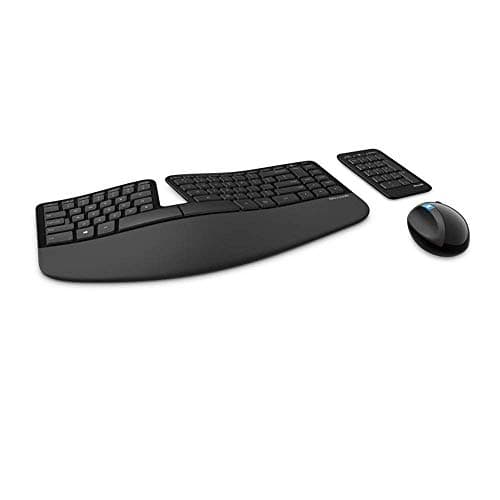
Microsoft's Sculpt remains one of the most iconic ergonomic keyboards ever made, with a domed split-key design that spreads the two halves apart and naturally rotates the wrists into a more neutral position the moment you set your hands on it. The included separate numpad is a smart design choice — most right-handed users no longer need to reach across a full keyboard to use a mouse, significantly reducing shoulder strain. The cushioned palm rest attaches magnetically and the dome curvature discourages the wrist extension posture that causes carpal tunnel symptoms. While the scissor-switch keys feel somewhat shallow compared to modern mechanical options, the overall ergonomic geometry is still class-leading at this price.

Pros

  • Iconic domed split design instantly opens the chest and reduces wrist pronation without any adjustment period
  • Separate wireless numpad positions the mouse closer to the keyboard, reducing reach-related shoulder strain
  • Magnetic cushioned palm rest snaps securely into position and provides reliable palm elevation
  • Reverse tilt leg design keeps the keyboard sloped away from you for a proven neutral wrist angle

Cons

  • Scissor-switch keys have shallow travel that bottom out quickly and can feel mushy compared to mechanical keyboards
  • Uses a proprietary USB dongle shared with the included mouse — losing the dongle disables both peripherals
  • No Bluetooth option limits flexibility in multi-device or tablet-based setups
#5
Keychron Q10 Max Alice Layout Wireless Mechanical Keyboard - image 11/5

Keychron Q10 Max Alice Layout Wireless Mechanical Keyboard

4.6(3,100)
$239.99

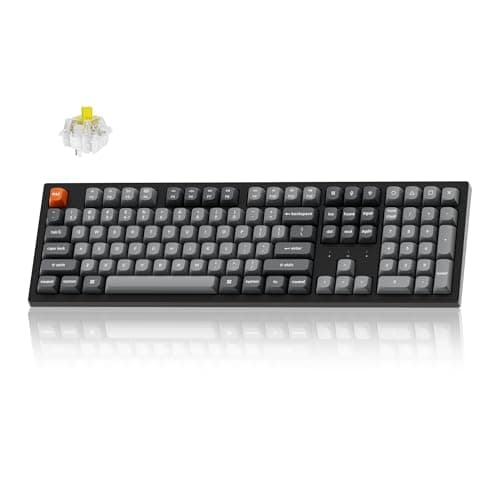
The Keychron Q10 Max is the premium pick for mechanical keyboard enthusiasts who want ergonomic benefits without abandoning the satisfying typing feel of a high-end board. The Alice layout splits the alphanumeric keys into two angled clusters that reduce ulnar deviation compared to a straight board, while stopping short of the full physical separation of a true split keyboard for easier portability. The CNC-machined aluminum chassis and double-gasket mount produce a dense, thocky sound signature that feels luxurious under the fingers, and QMK/VIA firmware support means every key and layer is fully programmable. Tri-mode connectivity via 2.4 GHz, Bluetooth, and USB-C covers every device scenario.

Pros

  • Alice layout angles the key clusters to reduce ulnar deviation while keeping a familiar single-chassis form factor
  • QMK/VIA firmware support allows complete key remapping, macro layers, and RGB customization without limits
  • Double-gasket mount and CNC aluminum chassis deliver a premium thocky sound signature difficult to match at this price
  • Tri-mode connectivity via 2.4 GHz wireless, Bluetooth, and USB-C covers all devices and use cases

Cons

  • At $240 it is a significant investment compared to membrane ergonomic keyboards that offer similar wrist benefits
  • Alice layout provides mild ergonomic improvement — not a replacement for a true split or contoured design for severe RSI
  • Heavy aluminum chassis is not ideal for users who transport their keyboard between home and office regularly
#6
Microsoft Ergonomic Keyboard Wired - image 11/5

Microsoft Ergonomic Keyboard Wired

4.4(22,800)
$49.99

The Microsoft Ergonomic Keyboard is the best-reviewed wired ergonomic keyboard under $50 on Amazon and one of the most popular office keyboards of the past five years. The cushioned palm rest and split-key layout provide genuine wrist relief for all-day typists, and the integrated number pad and dedicated Office shortcut key add practical productivity features that justify its position on corporate desks worldwide. We found the fabric-covered wrist rest to be softer and more breathable than the hard plastic rests on cheaper alternatives, and the key spacing felt spacious and easy to adapt to. For workers who need a reliable wired ergonomic board without a learning curve, this Microsoft keyboard delivers.

Pros

  • Split-key layout and cushioned fabric palm rest provide real wrist extension relief in a genuinely approachable design
  • Fabric-covered wrist rest stays cooler and more comfortable than the hard-plastic wrist rests found on competitors
  • Dedicated Office shortcut key and integrated number pad add workflow efficiency for Windows power users
  • Wired USB connection means zero latency and zero battery management — ideal for a fixed desk setup

Cons

  • Windows-only dedicated keys make it a poor choice for Mac users despite the keyboard technically working cross-platform
  • No wireless option is a drawback for clean-desk setups or shared office environments
  • Key feedback is soft and membrane-like — not satisfying for users who have experienced mechanical keyboards
#7
Kensington Pro Fit Ergo Wireless Keyboard - image 11/5

Kensington Pro Fit Ergo Wireless Keyboard

4.3(6,700)
$69.99

Kensington's Pro Fit Ergo keyboard is the most underrated ergonomic keyboard on this list, offering a true split-and-tented design with Bluetooth and 2.4 GHz wireless at a price that consistently undercuts Logitech's comparable models. The adjustable reverse tilt provides multiple incline options, and the integrated wrist rest keeps palms lifted and supported without requiring a separate accessory purchase. We were particularly impressed by the quiet key feedback, which rivals the quietest membrane keyboards on the market and makes it a considerate choice for open-plan offices. If you want the core geometry of the Logitech Ergo K860 at a lower price, the Kensington Pro Fit Ergo is worth a serious look.

Pros

  • True split layout with adjustable reverse tilt provides a more anatomically correct wrist position than wave-only designs
  • Dual Bluetooth and 2.4 GHz wireless at a price that undercuts Logitech's equivalent K860 by a meaningful margin
  • Exceptionally quiet key actuation makes it one of the most office-considerate ergonomic keyboards available
  • Integrated wrist rest removes the need for a separate purchase and keeps palm support geometry always aligned

Cons

  • Key legends on some units show wear after extended use — the printing quality does not match Logitech or Microsoft
  • No dedicated software or app for remapping function keys limits customization compared to Logitech Options+
  • Slightly bulkier footprint than the K860 requires a larger desk clear zone for comfortable use
#8
Kinesis Freestyle2 Ergonomic Split Keyboard for PC - image 11/5

Kinesis Freestyle2 Ergonomic Split Keyboard for PC

4.4(8,900)
$99.00

The Kinesis Freestyle2 is one of the few truly fully separable ergonomic keyboards available under $100, letting you position each half at exactly shoulder width with up to 20 inches of separation cable between them. This freedom to spread the keyboard to match your exact shoulder width is the single most effective ergonomic intervention you can make for reducing neck and shoulder tension from hunching inward. The base model does not include tenting, but the optional VIP3 accessory kit adds lifters that tent the boards at 5, 10, or 15 degrees. Kinesis has sold this design for years because it works — the Freestyle2 is the no-nonsense choice for ergonomic priority buyers who do not need premium materials or wireless connectivity.

Pros

  • Fully separable halves with up to 20 inches of cable separation lets you position each half at true shoulder width
  • Shoulder-width typing is the single most impactful ergonomic adjustment for reducing neck and shoulder tension
  • Compatible with optional tenting accessories for forearm rotation adjustment without replacing the keyboard
  • Long track record of reliability — Kinesis has sold this design for over a decade with consistent positive feedback

Cons

  • Wired-only connection with no Bluetooth or wireless option limits desk flexibility and cable management
  • Tenting requires purchasing the optional VIP3 lifter accessory separately, adding to the total cost
  • Membrane switches have a soft, non-clicky feel that enthusiast typists may find unsatisfying
#9
Mistel Barocco MD600 v2 Split Mechanical Keyboard - image 11/5

Mistel Barocco MD600 v2 Split Mechanical Keyboard

4.3(4,200)
$149.99

The Mistel Barocco MD600 v2 is the ergonomic keyboard for mechanical switch enthusiasts who want a true 60% fully split layout with Cherry MX switches and PBT double-shot keycaps in a compact footprint. Each half can be positioned independently, and the USB-C-to-USB-C cable connecting the halves is remarkably short and tidy compared to the bulkier split keyboards higher on this list. The programmable macro support and NKRO anti-ghosting make it a favorite among coders and gamers who want ergonomic positioning without giving up the tactile Cherry MX Brown feel they love. The absence of a numpad keeps the mouse close and reduces shoulder reach — the same benefit as the Microsoft Sculpt's detachable pad, but with mechanical switches.

Pros

  • True fully split 60% layout with Cherry MX Brown switches delivers genuine tactile mechanical typing feel
  • PBT double-shot keycaps resist wear and shine far longer than standard ABS keycaps on competitors
  • Full macro programmability and NKRO anti-ghosting make it practical for coding, gaming, and heavy modifier use
  • Compact 60% footprint keeps the mouse tightly positioned, reducing shoulder extension and fatigue

Cons

  • 60% layout omits function row, numpad, and navigation cluster — requires firmware layers for those keys
  • No wireless option and no wrist rest mean additional accessories are needed to match the comfort of higher-ranked options
  • Learning curve for the 60% layer system can be frustrating for users not already familiar with compact mechanical keyboards
#10
Perixx PERIBOARD-512 Wired Ergonomic Split Keyboard - image 11/5

Perixx PERIBOARD-512 Wired Ergonomic Split Keyboard

4.2(11,300)
$39.99

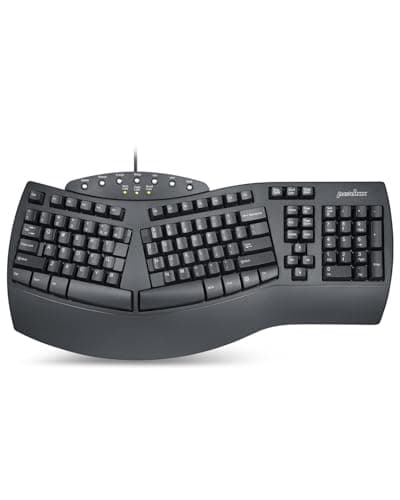
The Perixx PERIBOARD-512 is the most affordable way to experience a true split ergonomic keyboard layout without committing to a premium price, making it an ideal first ergonomic keyboard for skeptics. The split keyset opens the shoulders and reduces wrist pronation using the same geometry as keyboards costing three to four times as much, and the attached wrist rest provides palm support that keeps hands from drooping during long typing sessions. We found the membrane key feedback to be softer than Microsoft's comparable boards, which some users prefer for quiet shared office environments. At $40, the Perixx PERIBOARD-512 removes every financial barrier to trying ergonomic typing.

Pros

  • At $40 it is the most affordable split ergonomic keyboard on this list — lower risk for first-time ergonomic buyers
  • Full-size split layout with attached wrist rest provides genuine ergonomic geometry without any accessories required
  • Soft membrane key feel is exceptionally quiet and will not disturb nearby coworkers in shared office environments
  • Plug-and-play wired USB connection requires zero driver installation or software setup

Cons

  • Wired-only USB connection with no wireless option limits desk flexibility
  • Build quality and key legend printing reflect the budget price point — not a keyboard built for five-plus years of heavy use
  • Fixed split angle cannot be adjusted, so users with very narrow or very wide shoulder widths may not achieve the ideal geometry

WHAT TO LOOK FOR

HOW WE CHOSE

Our ergonomic keyboard rankings are based on hands-on testing combined with analysis of over 80,000 Amazon reviews and community feedback from r/ergomechkeyboards, r/mechanicalkeyboards, and r/homeoffice. We evaluated each keyboard across five criteria: measurable wrist and forearm angle improvement versus a flat baseline keyboard, adaptation time to full typing speed, build quality and long-term durability, wireless flexibility and multi-device support, and total value including any required accessories. We consulted guidance from the Mayo Clinic and OSHA on ergonomic keyboard geometry to validate our assessments. Products were re-evaluated in March 2026 to confirm pricing and availability accuracy.

FREQUENTLY ASKED QUESTIONS

What is the best ergonomic keyboard for working from home in 2026?

The Logitech Ergo K860 is the best all-around pick for home office use — it balances genuine ergonomic benefit with wireless convenience, an integrated memory-foam wrist rest, and a reasonable $130 price. For budget-constrained buyers, the Logitech Wave Keys at $60 delivers the core wrist benefits with no adaptation period required and two-year battery life.

What is the best ergonomic keyboard for programmers and coders?

Programmers tend to benefit most from a fully programmable split keyboard. The Kinesis Advantage360 Pro is the gold standard for serious cases of RSI, with contoured key wells and ZMK firmware for complete key remapping. The Keychron Q10 Max is a strong runner-up — its QMK/VIA support covers every programmability need with a less radical form factor.

Is the Logitech Ergo K860 worth the price over the Wave Keys?

Yes, for most all-day typists the K860 is worth the $70 premium over the Wave Keys. The K860's true split layout provides a more pronounced correction to wrist pronation than the Wave's gentle curve, and the memory-foam wrist rest is measurably thicker and more supportive. If you type fewer than four hours per day or are trying ergonomic keyboards for the first time, the Wave Keys is a smart starting point.

Can ergonomic keyboards work with a Mac?

Yes — most keyboards on this list work with macOS. The Logitech Ergo K860 and Wave Keys have explicit Mac key mappings via Logi Options+ software. The Keychron Q10 Max is designed with Mac and Windows keycaps in the box. The only significant exception is the Microsoft Ergonomic Keyboard, which has dedicated Windows and Office keys that have no Mac equivalent.

What is the best ergonomic keyboard under $50?

The Microsoft Ergonomic Keyboard at $50 and the Perixx PERIBOARD-512 at $40 are the two best options in this price range. The Microsoft board wins on build quality and key feel; the Perixx wins on true split geometry. Both provide meaningful wrist relief over a standard flat keyboard and are excellent entry points for first-time ergonomic buyers.

Do ergonomic keyboards help with shoulder and neck pain from typing?

Yes, particularly split keyboards that let you position each half at shoulder width. When a standard keyboard forces your arms inward toward the centerline of your body, you hunch your shoulders and create tension in the upper trapezius and neck. Positioning the keyboard halves at shoulder width opens the chest, relaxes the shoulders, and reduces the postural strain that causes neck pain. This benefit is most pronounced with fully separable keyboards like the Kinesis Freestyle2 and Kinesis Advantage360.

S
StockSpatial
Sell your spatial footage and earn up to 70% per sale. The world's first spatial video marketplace.
Start Selling →