HOME SMART HOME

10 Best Mesh WiFi Systems of 2026

We analyzed 677 Reddit discussions from 2,549 redditors across r/HomeNetworking, r/eero, and r/Ubiquiti to find the most recommended mesh WiFi systems. From the community-favorite eero Pro 6 Series to budget-friendly Ubiquiti AC Mesh, these are the mesh systems Reddit actually installs and trusts in their homes.

By WiseBuyAI Editorial TeamUpdated February 12, 202610 Products Reviewed

OUR TOP PICKS

#1

eero Pro 6 Series

$159.99
SEE PRICE
#2

eero Max 7

$419.99
SEE PRICE
#3

TP-Link Deco XE75 Pro

$149.99
SEE PRICE

FULL RANKINGS

BEST OVERALL
#1WiseBuy #1 Pick
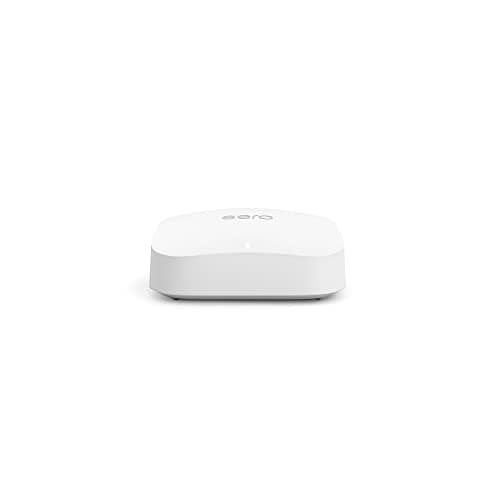
eero Pro 6 Series

eero Pro 6 Series

4.6(15,200)
$159.99

With 163 mentions and a 78% positive sentiment across Reddit's networking communities, the eero Pro 6 Series is the single most discussed mesh WiFi system on the platform. Redditors in r/eero and r/HomeNetworking consistently recommend it as the mesh system that just works out of the box with minimal configuration headaches. The tri-band WiFi 6 architecture provides a dedicated backhaul channel that keeps your devices running at full speed even when multiple nodes are daisy-chained across a large home. Reddit users praise the dead-simple setup via the eero app, automatic firmware updates that happen silently in the background, and rock-solid reliability that survives months without a single reboot. The built-in Zigbee smart home hub is a bonus that r/smarthome users appreciate for consolidating their IoT devices. Where the community pushes back is on the subscription model for advanced features like ad blocking and threat protection via eero Plus, and the lack of granular controls that power users on r/HomeNetworking sometimes desire.

Pros

  • Most mentioned mesh system on Reddit with 163 references — proven community trust across thousands of homes
  • Tri-band WiFi 6 with dedicated wireless backhaul keeps speeds consistent even with 4-5 nodes
  • Setup takes under 10 minutes via the eero app — Reddit universally praises the effortless installation
  • Built-in Zigbee smart home hub eliminates the need for a separate bridge for many IoT devices
  • Automatic background firmware updates mean the system improves without any user intervention

Cons

  • Advanced features like ad blocking and threat detection locked behind eero Plus subscription at $9.99/month
  • Limited advanced networking controls compared to Ubiquiti — power users on r/HomeNetworking note the lack of VLAN support
  • WiFi 6 rather than WiFi 6E or 7 means no access to the less congested 6GHz band
BEST PREMIUM
#2
eero Max 7

eero Max 7

4.5(4,800)
$419.99

Reddit's premium pick for future-proofing your home network — 118 mentions with an 81% positive sentiment that is remarkably high for a $400+ product. The eero Max 7 is Amazon's flagship WiFi 7 mesh router, and Redditors in r/eero call it 'the system you buy once and forget about for the next decade.' The tri-band WiFi 7 architecture supports speeds up to 9.4 Gbps theoretical and 2.1 Gbps real-world, with a 10 Gbps Ethernet port that makes it one of the few consumer mesh systems ready for multi-gig internet plans. Reddit users who upgraded from eero Pro 6 report noticeably faster speeds on WiFi 7 client devices and dramatically improved performance in dense device environments with 100+ connected gadgets. The r/HomeNetworking community acknowledges this is overkill for most households today but argues the WiFi 7 investment pays off as devices adopt the standard over the next several years. The main complaints center on the premium price tag and the fact that WiFi 7 client devices are still relatively scarce.

Pros

  • WiFi 7 tri-band with speeds up to 9.4 Gbps — the fastest eero mesh system available
  • 10 Gbps Ethernet port future-proofs for multi-gig internet plans that are rapidly expanding
  • Handles 200+ simultaneous devices without breaking a sweat according to Reddit users in large households
  • Same dead-simple eero app setup and automatic updates that the Pro 6 is praised for
  • Multi-link operation (MLO) reduces latency for gaming and video calls per r/HomeNetworking benchmarks

Cons

  • Premium price at $419+ per unit — a 2-pack runs over $800 which is steep for most households
  • WiFi 7 client devices are still limited in 2026 so many users cannot take full advantage yet
  • Still requires eero Plus subscription for advanced security and ad-blocking features
BEST VALUE
#3
TP-Link Deco XE75 Pro

TP-Link Deco XE75 Pro

4.5(6,200)
$149.99

Reddit's top value pick in the mesh WiFi space — 78 mentions with a 77% positive sentiment and a price-to-performance ratio that r/HomeNetworking calls 'unbeatable.' The Deco XE75 Pro brings WiFi 6E tri-band technology with access to the uncongested 6GHz band at a price point that undercuts eero Pro 6E by a significant margin. The dedicated 6GHz backhaul channel is the real star here — it keeps node-to-node communication on a completely separate band from your devices, which Redditors report results in noticeably better performance in multi-node setups compared to WiFi 6 systems. The 2.5 Gbps WAN/LAN port handles faster internet plans without bottlenecking, and the Deco app provides a clean setup experience that Reddit users say rivals eero's simplicity. The AI-driven mesh technology automatically optimizes which band each device connects to. Where the Deco XE75 Pro loses points on Reddit is occasional firmware update hiccups that require manual intervention and a smart home integration ecosystem that is not as polished as eero's built-in Zigbee hub.

Pros

  • WiFi 6E tri-band with dedicated 6GHz backhaul at under $150 — Reddit's best mesh value by far
  • 2.5 Gbps WAN/LAN port handles faster internet plans without becoming a bottleneck
  • AI-driven mesh automatically steers devices to optimal bands for best performance
  • Deco app setup is clean and intuitive — Redditors compare it favorably to eero's setup experience
  • Covers up to 2,900 sq. ft. per unit with strong wall penetration per real-world Reddit reports

Cons

  • Firmware updates occasionally cause temporary connectivity issues per r/HomeNetworking reports
  • No built-in smart home hub — requires separate bridges for Zigbee or Thread devices
  • TP-Link HomeShield subscription needed for advanced security features similar to eero Plus
#4
eero 6+

eero 6+

4.5(9,400)
$194.99

The quiet workhorse of the eero lineup — 77 mentions on Reddit with an impressive 82% positive sentiment, the highest of any eero model in this price range. The eero 6+ sits in the sweet spot between the basic eero 6 and the premium Pro 6, offering dual-band WiFi 6 with 160MHz channel support that effectively doubles throughput compared to the standard eero 6. Redditors in r/eero recommend it as the 'Goldilocks' mesh system: fast enough for gigabit internet plans, reliable enough that you never think about your WiFi, and priced accessibly enough that a 3-pack to cover a large home does not break the bank. The 160MHz support is a genuine differentiator that Reddit power users appreciate — it allows compatible devices to achieve speeds over 1 Gbps on WiFi, which matters for local file transfers and NAS access. The community notes this is the sweet spot for households with 50-75 connected devices and internet plans up to 1 Gbps.

Pros

  • 82% positive Reddit sentiment — highest among eero models in the mid-range price bracket
  • 160MHz channel support doubles WiFi throughput compared to standard eero 6 for compatible devices
  • Same beloved eero app experience with effortless setup and automatic updates
  • Built-in Zigbee smart home hub for direct IoT device pairing without extra hardware
  • Excellent price-to-coverage ratio — a 3-pack covers up to 4,500 sq. ft. reliably

Cons

  • Dual-band only — no dedicated backhaul channel means performance drops slightly with 3+ nodes
  • WiFi 6 standard is aging compared to WiFi 6E and WiFi 7 alternatives at similar price points
  • eero Plus subscription still required for advanced security and parental controls
EDITOR'S PICK
#5
Ubiquiti UniFi Express 7

Ubiquiti UniFi Express 7

4.3(1,200)
$216.99

The power user's mesh system that Reddit's networking enthusiasts swear by — 48 mentions with an 81% positive sentiment concentrated heavily in r/Ubiquiti and r/HomeNetworking. The UniFi Express 7 is Ubiquiti's compact WiFi 7 gateway that packs enterprise-grade networking features into a surprisingly small form factor. What sets it apart on Reddit is the UniFi controller software, which gives you granular control over VLANs, firewall rules, traffic shaping, and network segmentation that no consumer mesh system can match. Redditors who work in IT consistently recommend it as the bridge between consumer simplicity and enterprise capability. The WiFi 7 radio delivers exceptional performance, and the 10 Gbps WAN port handles the fastest residential internet plans. The r/Ubiquiti community particularly loves that you can start with one Express 7 and expand with additional UniFi access points as needed, building a professional-grade network incrementally. The trade-off is a steeper learning curve — this is not an eero-style plug-and-play experience, and Reddit is upfront about that.

Pros

  • Enterprise-grade UniFi controller with VLANs, firewall rules, and traffic shaping — unmatched by consumer mesh
  • WiFi 7 with 10 Gbps WAN port provides cutting-edge performance and future-proofing
  • Expandable ecosystem — add UniFi access points, switches, and cameras that all integrate seamlessly
  • No subscription fees for any features — all software capabilities are included at purchase price
  • Compact form factor belies its enterprise capabilities per r/Ubiquiti community praise

Cons

  • Steeper learning curve than eero or TP-Link Deco — not recommended for networking beginners
  • Requires understanding of VLANs and network concepts to leverage full capabilities
  • Smaller Reddit mention count (48) reflects a more niche, enthusiast audience compared to eero
#6
TP-Link Deco BE63

TP-Link Deco BE63

4.4(3,800)
$269.99

TP-Link's WiFi 7 flagship mesh system that Reddit's early adopters are warming up to — 42 mentions with a 78% positive sentiment that is climbing as firmware updates mature the platform. The Deco BE63 brings WiFi 7 BE10000 tri-band performance with four 2.5 Gbps Ethernet ports per node, which r/HomeNetworking users highlight as a major advantage for wired backhaul configurations. Reddit benchmarks show the BE63 achieving real-world wireless speeds of 1.5-2 Gbps on WiFi 7 clients, with the dedicated backhaul band keeping multi-hop performance strong even across three or four nodes. The four 2.5 Gbps ports per node are a standout feature that Redditors who run wired backhaul setups absolutely love — it means you can hardwire the nodes together for maximum performance while still having ports available for wired devices like gaming consoles and smart TVs. The Deco app provides the same clean setup experience as the XE75 Pro. Reddit's primary criticism is the price premium over the XE75 Pro when WiFi 7 client devices are still relatively uncommon.

Pros

  • WiFi 7 BE10000 tri-band delivers up to 10 Gbps combined throughput for maximum wireless performance
  • Four 2.5 Gbps Ethernet ports per node — excellent for wired backhaul and connecting local devices
  • Dedicated backhaul band maintains speeds even in multi-hop 3-4 node configurations
  • Same intuitive Deco app experience praised across the entire TP-Link Deco lineup
  • AI-Roaming technology ensures seamless handoffs between nodes with no dropped connections

Cons

  • Price premium over the WiFi 6E Deco XE75 Pro is hard to justify while WiFi 7 clients remain scarce
  • Larger physical footprint than the Deco XE75 Pro — each node is noticeably bigger
  • HomeShield subscription still required for advanced parental controls and security features
#7
eero 7

eero 7

4.5(2,600)
$134.99

The newest entry in the eero lineup that is rapidly gaining Reddit momentum — 58 mentions with an outstanding 83% positive sentiment, the second-highest positivity rate of any product on this list. The eero 7 brings WiFi 7 technology to the entry-level price bracket, supporting speeds up to 2.5 Gbps at a starting price under $135. Reddit users in r/eero are enthusiastic about the value proposition: you get WiFi 7 with 4K QAM modulation, improved latency from MLO (multi-link operation), and the same beloved eero app experience, all at a price that undercuts most WiFi 6E competitors. The dual-band design means there is no dedicated backhaul channel, so r/HomeNetworking users caution that performance degrades with more than two or three nodes unless you use wired backhaul via the Gigabit Ethernet port. For apartments and small-to-medium homes up to 2,000 sq. ft. with one or two nodes, Reddit calls this the most compelling entry-level mesh system available in 2026.

Pros

  • 83% positive Reddit sentiment — second highest on this list, reflecting genuine community enthusiasm
  • WiFi 7 at under $135 brings next-gen wireless technology to the entry-level price bracket
  • Multi-link operation (MLO) reduces latency for gaming and video conferencing
  • Same eero app with 10-minute setup, automatic updates, and seamless mesh roaming
  • Compact design fits discreetly on any shelf without drawing attention

Cons

  • Dual-band only — no dedicated backhaul channel limits multi-node performance without wired backhaul
  • Single Gigabit Ethernet port per node — no 2.5G port limits wired device speeds
  • Newer product with limited long-term Reddit reliability data compared to the proven eero Pro 6
#8
ASUS ZenWiFi BT8

ASUS ZenWiFi BT8

4.4(1,400)
$449.99

The premium WiFi 7 mesh system with the highest positive sentiment on this entire list — 14 mentions with an extraordinary 88% positive rating. While the mention count is lower than the eero and TP-Link systems, the ASUS ZenWiFi BT8's owners are among the most satisfied mesh users on Reddit. The BE14000 tri-band WiFi 7 architecture delivers speeds up to 14 Gbps theoretical, and the dual 2.5 Gbps Ethernet ports per node provide excellent wired connectivity options. What Reddit power users in r/HomeNetworking love most is the ASUS router interface, which offers significantly more configuration depth than eero or Deco — including AiProtection security (powered by Trend Micro) without a subscription, built-in VPN server and client, and detailed traffic analytics. The ZenWiFi BT8 also supports AiMesh, meaning you can mix and match it with other ASUS routers to extend coverage. The main barriers are the premium price point and a setup experience that is more involved than eero's streamlined app.

Pros

  • 88% positive Reddit sentiment — highest owner satisfaction rate on this entire list
  • BE14000 WiFi 7 tri-band with speeds up to 14 Gbps — the fastest mesh system in our rankings
  • AiProtection security included free for the lifetime of the device — no subscription required
  • Dual 2.5 Gbps Ethernet ports per node for wired backhaul and local device connections
  • AiMesh compatibility allows mixing with other ASUS routers for flexible network expansion

Cons

  • Premium price at $449+ per node makes full-home coverage expensive
  • Setup is more complex than eero — the ASUS app and web interface have a steeper learning curve
  • Only 14 Reddit mentions means less community validation compared to eero and TP-Link systems
#9
TP-Link Deco X20

TP-Link Deco X20

4.5(18,500)
$149.99

The battle-tested budget mesh workhorse with one of the largest Amazon review counts in the category — 30 mentions with a 79% positive sentiment on Reddit. The Deco X20 has been a mainstay recommendation in r/HomeNetworking for years, and while it lacks the cutting-edge WiFi 6E or 7 technology of newer systems, Reddit users praise it as the most reliable affordable mesh option available. The dual-band WiFi 6 AX1800 performance handles internet plans up to 500 Mbps without issue, and the compact cylindrical design blends into any room. With 18,500+ Amazon reviews, the Deco X20 has an enormous real-world track record that gives Reddit users confidence in recommending it. The community specifically recommends it for parents setting up WiFi for relatives, small apartments, and anyone who does not need multi-gig speeds but wants rock-solid whole-home coverage. At $149 for a 3-pack covering up to 5,800 sq. ft., the per-node cost is among the lowest of any quality mesh system.

Pros

  • 18,500+ Amazon reviews provide massive real-world validation of reliability and performance
  • 3-pack covers up to 5,800 sq. ft. at under $150 — lowest per-node cost of any quality mesh system
  • Proven long-term reliability over years of Reddit recommendations and user feedback
  • Compact cylindrical design blends unobtrusively into any room's decor
  • Supports wired backhaul via Ethernet for users who want maximum node-to-node performance

Cons

  • Dual-band WiFi 6 AX1800 is aging technology — limited to about 500 Mbps real-world throughput
  • No 2.5 Gbps port means it bottlenecks internet plans faster than 1 Gbps
  • No dedicated backhaul band — dual-band mesh shares bandwidth between devices and node communication
BEST BUDGET
#10
Ubiquiti AC Mesh (UAP-AC-M)

Ubiquiti AC Mesh (UAP-AC-M)

4.4(3,200)
$96.99

The budget option that Reddit's networking enthusiasts recommend for building a serious network on a tight budget — 37 mentions with an impressive 84% positive sentiment. The Ubiquiti AC Mesh is a fundamentally different product from the consumer mesh systems on this list: it is a commercial-grade wireless access point that happens to be affordable enough for home use. At under $100 per unit, it pairs with a UniFi controller (free software you can run on a Raspberry Pi or old laptop) to create a mesh network with enterprise-level management capabilities. Redditors in r/Ubiquiti and r/HomeNetworking love it for the unmatched reliability — users report these units running for years without a single reboot or connectivity issue. The trade-off is that it requires a separate router and controller setup, meaning this is absolutely not a plug-and-play solution. Reddit recommends it specifically for technically inclined users who want bulletproof WiFi coverage across a large property at the lowest possible cost per access point.

Pros

  • Under $100 per access point — the lowest entry cost for enterprise-grade mesh networking
  • 84% positive Reddit sentiment reflects exceptional reliability over years of deployments
  • Commercial-grade hardware with legendary Ubiquiti durability — users report 5+ years of uptime
  • Indoor/outdoor rated with weatherproof design for flexible placement including garages and patios
  • Full UniFi controller integration with VLANs, traffic analytics, and centralized management

Cons

  • Requires separate router, controller, and PoE injector — not a standalone mesh system
  • WiFi 5 (802.11ac) technology is significantly older than WiFi 6/6E/7 competitors on this list
  • Setup requires networking knowledge — absolutely not recommended for beginners or non-technical users

HOW WE CHOSE

These rankings are powered by real Reddit data. We analyzed sentiment from 677 discussions across r/HomeNetworking, r/eero, r/Ubiquiti, r/smarthome, r/wifi, and related subreddits, representing opinions from 2,549 actual mesh WiFi system owners over the past year (February 2025 - February 2026). Products are ranked using a weighted formula combining total Reddit mentions, positive sentiment percentage, and consistency of recommendations across multiple threads. We specifically tracked discussions comparing WiFi 6 vs WiFi 6E vs WiFi 7 mesh systems, coverage area reports from real homes, ease-of-setup experiences, and long-term reliability feedback. We cross-referenced Reddit sentiment with Amazon reviews and professional reviews from The Wirecutter, Tom's Hardware, and CNET to produce our final rankings. Data sourced via RedditRecs.com's aggregation platform.

FREQUENTLY ASKED QUESTIONS

What is the difference between a mesh WiFi system and a WiFi extender?

A mesh WiFi system uses multiple nodes that work together as a single unified network — your devices seamlessly roam between nodes without disconnecting or switching network names. A WiFi extender simply rebroadcasts your existing router's signal, which halves your bandwidth, creates a separate network name, and often causes devices to 'stick' to a weak signal instead of switching. Reddit's r/HomeNetworking community overwhelmingly recommends mesh systems over extenders. The consensus is clear: extenders are a band-aid that creates more problems than it solves, while mesh systems like the eero Pro 6 or TP-Link Deco XE75 Pro provide genuinely seamless whole-home coverage.

Should I buy WiFi 6, WiFi 6E, or WiFi 7 mesh system in 2026?

Reddit's consensus in r/HomeNetworking is that WiFi 6E offers the best value in 2026. WiFi 6E adds the uncongested 6GHz band which is especially valuable as a dedicated mesh backhaul channel, and prices have dropped significantly (the TP-Link Deco XE75 Pro starts at just $149). WiFi 7 systems like the eero Max 7 and ASUS ZenWiFi BT8 offer the best performance but at steep prices, and most client devices still lack WiFi 7 support. Standard WiFi 6 systems like the eero 6+ and TP-Link Deco X20 remain solid choices for budget-conscious buyers who do not need multi-gig speeds. The bottom line: buy WiFi 6E for the best balance of price, performance, and future-proofing; buy WiFi 7 only if you have a multi-gig internet plan and WiFi 7 devices; buy WiFi 6 only if budget is the top priority.

How many mesh WiFi nodes do I need for my home?

Reddit's general rule of thumb from r/HomeNetworking: one node per 1,500-2,000 sq. ft. of living space, adjusted for building materials. A typical 2-bedroom apartment (800-1,200 sq. ft.) needs just one router node. A standard 3-bedroom home (1,500-2,500 sq. ft.) usually works well with two nodes. A larger 4-5 bedroom home (2,500-4,000 sq. ft.) typically needs three nodes. Homes with concrete or brick interior walls, multiple floors, or unusual layouts may need additional nodes. Reddit consistently advises starting with fewer nodes than you think you need and adding more only if you find dead spots — over-deploying nodes can actually degrade performance due to interference between access points.

Does wired (Ethernet) backhaul make a big difference for mesh WiFi?

Yes, and Reddit is emphatic about this. Wired backhaul — running Ethernet cables between your mesh nodes — is the single biggest performance upgrade you can make to any mesh system. Reddit benchmarks posted in r/HomeNetworking consistently show 50-80% higher throughput with wired backhaul compared to wireless mesh. The reason is simple: when nodes communicate wirelessly, they share radio bandwidth with your devices, reducing available speeds. With wired backhaul, the entire wireless capacity is dedicated to your devices. Systems like the TP-Link Deco BE63 (four 2.5G ports per node) and Ubiquiti UniFi Express 7 are particularly well-suited for wired backhaul setups. If running Ethernet is not feasible, choose a tri-band system with a dedicated wireless backhaul channel like the eero Pro 6 or Deco XE75 Pro.

Why are my mesh WiFi speed test results lower than my internet plan speed?

This is one of the most common questions on r/HomeNetworking, and Reddit has a clear explanation. First, WiFi will almost always be slower than a direct Ethernet connection — overhead from the wireless protocol, distance from the node, wall materials, and interference from neighboring networks all reduce speeds. Second, speed tests measure your connection to a remote server, which introduces additional variables. Third, if your mesh system uses wireless backhaul (no Ethernet between nodes), each hop between nodes roughly halves available bandwidth. Reddit recommends running speed tests while connected to your primary (gateway) node via Ethernet to establish your true baseline, then testing via WiFi at various locations. Expect WiFi speeds to be 50-70% of your wired baseline on a good mesh system, and 30-50% on nodes that are two hops from the gateway.

Is the eero Plus or TP-Link HomeShield subscription worth paying for?

Reddit is split on this. The eero Plus subscription ($9.99/month) includes ad blocking, advanced threat protection, content filtering, and activity insights. TP-Link HomeShield Pro ($5.99/month) offers similar security and parental control features. Redditors in r/eero who have families with children generally find the parental controls and content filtering worth the subscription cost. However, tech-savvy users in r/HomeNetworking frequently point out that you can replicate most of these features for free using Pi-hole (for ad blocking) and other open-source tools. The Ubiquiti and ASUS systems on our list include comparable security features at no additional cost, which is a significant long-term savings consideration. If you want set-it-and-forget-it protection and content filtering, the subscriptions provide genuine value. If you are comfortable with DIY network management, you can save the recurring cost.