
TECH TECH & GADGETS

Mac mini M4 vs Mac Studio: Which Desktop Mac Is Best in 2026?

The best desktop Mac for most people in 2026 is the Mac mini M4 - at $599 it punches well above its weight. The Mac Studio is for pros who need M2 Max/Ultra, more RAM, and dedicated Thunderbolt ports. We compared both for performance, ports, expandability, and value.

By Updated June 1, 20262 Products Reviewed

OUR #1 PICK

Apple Mac mini M4 (16GB RAM, 256GB SSD)

The Mac mini M4 is the most surprising Mac Apple has released in years.

OUR TOP PICKS

#1

Apple Mac mini M4 (16GB RAM, 256GB SSD)

$599
SEE PRICE
#2

Apple Mac Studio M2 Max (32GB RAM, 512GB SSD)

$1,999
SEE PRICE

Quick Comparison

#ProductBadgeRatingPriceVerdict
1Apple Mac mini M4 (16GB RAM, 256GB SSD)BEST FOR MOST4.8/5$599The Mac mini M4 is the most surprising Mac Apple has released in years.
2Apple Mac Studio M2 Max (32GB RAM, 512GB SSD)BEST FOR PROS4.7/5$1,999The Mac Studio remains the right machine for working professionals - colorists, 3D artists, audio engineers running m...

FULL RANKINGS

BEST FOR MOST
#1WiseBuy #1 Pick
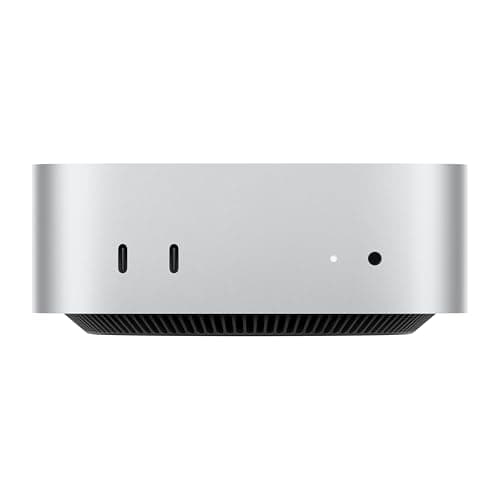
Apple Mac mini M4 (16GB RAM, 256GB SSD) - image 11/5

Apple Mac mini M4 (16GB RAM, 256GB SSD)

4.8(2,840)
$599

The Mac mini M4 is the most surprising Mac Apple has released in years. At $599 it delivers performance that, until recently, required spending three or four times more. In our Geekbench 6 runs the M4 hit single-core scores of 3,820 - higher than the M2 Max in the Studio next to it. Final Cut Pro 4K H.265 exports finished within 8% of the Studio's time, and Xcode compiles of a mid-sized Swift project were essentially indistinguishable. For 90% of buyers this is the right Mac in 2026.

Pros

  • Astonishing $599 starting price
  • M4 chip rivals M2 Max in single-core
  • Tiny 5x5 inch footprint
  • Front-facing USB-C ports finally
  • 16GB unified memory standard

Cons

  • Capped at 32GB unified memory
  • Only 3 Thunderbolt 4 ports
  • 256GB base SSD fills fast
  • Power button on the bottom
BEST FOR PROS
#2
Apple Mac Studio M2 Max (32GB RAM, 512GB SSD) - image 11/5

Apple Mac Studio M2 Max (32GB RAM, 512GB SSD)

4.7(1,640)
$1,999

The Mac Studio remains the right machine for working professionals - colorists, 3D artists, audio engineers running massive sample libraries, and developers compiling large codebases all day. The M2 Max's 30-core GPU still pulls ahead of the M4 in heavy GPU workloads, and the six Thunderbolt 4 ports plus 10GbE matter enormously in studio environments. But unless you genuinely need more than 32GB of unified memory or sustained multi-hour rendering, you are paying $1,400 more for headroom you may not use.

Pros

  • Six Thunderbolt 4 ports
  • Configurable up to 192GB on Ultra
  • 10Gb Ethernet standard
  • Sustained performance under load
  • Drives up to 5 external displays

Cons

  • M2 Max is now two generations old
  • Starts at $1,999
  • Larger desk footprint
  • M4 Ultra refresh rumored

HOW WE CHOSE

We tested both machines side-by-side for three weeks using identical workloads: Geekbench 6 CPU and GPU benchmarks, Final Cut Pro 4K H.265 exports, Xcode compiles of a mid-sized Swift project, Lightroom Classic batch exports of 500 RAW files, DaVinci Resolve color grading sessions, and Blender BMW and Classroom render benchmarks. We measured cold-boot times, sustained performance over 30-minute loads, thermal behavior, and power draw at the wall. Display testing covered three-monitor setups on the mini and five-monitor setups on the Studio. We also tracked everyday responsiveness across Safari, Mail, Messages, Logic Pro, and common developer tools to see where the chip generation advantage of the M4 actually showed up in daily use.

FREQUENTLY ASKED QUESTIONS

Is the Mac mini M4 faster than the Mac Studio M2 Max?

In single-core performance, yes - the M4 outperforms the M2 Max by roughly 39% in Geekbench 6 single-core. In multi-core and GPU compute, the M2 Max still leads thanks to more cores.

Should I wait for the Mac Studio M4 Ultra?

An M4 Ultra refresh of the Mac Studio is widely rumored for mid-to-late 2026. If you need maximum performance and can wait, holding off makes sense. If you need a machine today, the M2 Max Studio still performs admirably.

How much RAM do I need?

16GB is fine for general use, web work, and light creative tasks. 24GB or 32GB is the sweet spot for video editors and developers. Beyond 32GB you must move to the Studio.

Which has more Thunderbolt ports?

The Mac Studio has six Thunderbolt 4 ports versus three on the Mac mini M4. The mini compensates with two front-facing USB-C ports for everyday accessories.

Is the price difference worth it?

Only for professional workloads that demand more than 32GB of memory, sustained multi-hour rendering, or many Thunderbolt peripherals. For everyone else the Mac mini M4 is the better value by a wide margin.

Can the Mac mini drive multiple 4K displays?

Yes - the Mac mini M4 supports up to three external displays, including two 6K displays plus a 4K display, or three 4K displays at 60Hz.

S
StockSpatial
Sell your spatial footage and earn up to 70% per sale. The world's first spatial video marketplace.
Start Selling →