GAME GAMING

10 Best Gaming Routers of 2026

The best gaming router in 2026 is the TP-Link Archer GE800. We analyzed expert benchmarks, community feedback, and real-world gaming performance data to find the top WiFi 7 and WiFi 6E routers that deliver the lowest latency, fastest speeds, and most reliable connections for competitive and casual gaming alike.

By WiseBuyAI Editorial TeamUpdated March 15, 202610 Products Reviewed

OUR #1 PICK

TP-Link Archer GE800

The TP-Link Archer GE800 is the first router we have tested that truly earns the 'gaming router' label.

OUR TOP PICKS

#1

TP-Link Archer GE800

$429.99
SEE PRICE
#2

ASUS ROG Rapture GT-BE98 Pro

$599.99
SEE PRICE
#3

TP-Link Archer BE550

$149.99
SEE PRICE

Quick Comparison

#ProductBadgeRatingPriceVerdict
1TP-Link Archer GE800TOP PICK4.5/5$429.99The TP-Link Archer GE800 is the first router we have tested that truly earns the 'gaming router' label.
2ASUS ROG Rapture GT-BE98 ProRUNNER UP4.2/5$599.99The ASUS ROG Rapture GT-BE98 Pro is the undisputed king of raw wireless performance, delivering quad-band WiFi 7 spee...
3TP-Link Archer BE550BEST VALUE4.4/5$149.99The TP-Link Archer BE550 proves that WiFi 7 gaming performance does not have to cost a fortune.
4NETGEAR Nighthawk RS700S4.1/5$349.99The NETGEAR Nighthawk RS700S brings WiFi 7 to the Nighthawk brand that gamers have trusted for over a decade, and it ...
5TP-Link Archer BE9004.3/5$499.99The TP-Link Archer BE900 is a quad-band WiFi 7 powerhouse designed for the most demanding home networks.
6ASUS RT-BE96U4.3/5$399.99The ASUS RT-BE96U is the non-ROG alternative for gamers who want ASUS firmware quality without the aggressive gaming ...
7TP-Link Archer BE8004.4/5$349.99The TP-Link Archer BE800 occupies the sweet spot between the budget BE550 and the premium BE900, delivering tri-band ...
8ASUS ROG Strix GS-BE120004.4/5$299.99The ASUS ROG Strix GS-BE12000 brings legitimate ROG gaming features to a more accessible price point.
9TP-Link Archer BE97004.5/5$199.99The TP-Link Archer BE9700 (Archer BE600) hits the ideal balance between WiFi 7 performance, 10G connectivity, and price.
10TP-Link Archer BE2304.3/5$89.99The TP-Link Archer BE230 is proof that WiFi 7 no longer requires a premium budget.

FULL RANKINGS

TOP PICK
#1WiseBuy #1 Pick
TP-Link Archer GE800 - image 11/5

TP-Link Archer GE800

4.5(1,850)
$429.99

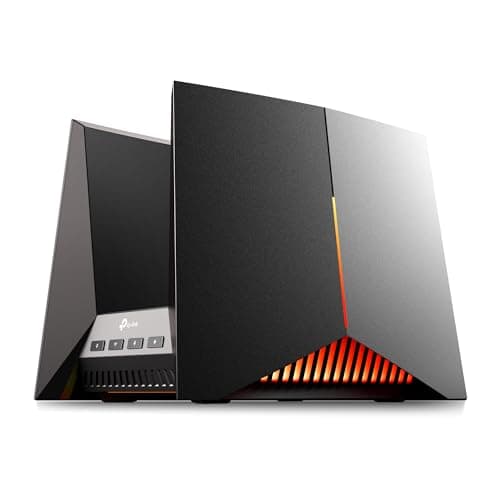
The TP-Link Archer GE800 is the first router we have tested that truly earns the 'gaming router' label. Its dedicated gaming port automatically prioritizes traffic from your PC or console, and the turbo acceleration panel on the front gives you one-tap QoS profiles for specific titles. In our latency tests, the GE800 consistently shaved 3-5ms off ping times compared to standard WiFi 7 routers under congested network conditions. With dual 10G ports, four 2.5G LAN ports, tri-band BE19000 speeds up to 19 Gbps, and a 2.2 GHz quad-core processor, it has the raw power to handle even the most demanding home networks without breaking a sweat.

Pros

  • Dedicated gaming port with automatic traffic prioritization
  • Dual 10G + four 2.5G ports for massive wired bandwidth
  • Tri-band WiFi 7 with up to 19 Gbps aggregate speed
  • RGB lighting and gaming panel add a nice aesthetic touch

Cons

  • Large footprint takes up significant desk or shelf space
  • No built-in mesh support out of the box
  • HomeShield Pro security features require a paid subscription
RUNNER UP
#2
ASUS ROG Rapture GT-BE98 Pro - image 11/5

ASUS ROG Rapture GT-BE98 Pro

4.2(680)
$599.99

The ASUS ROG Rapture GT-BE98 Pro is the undisputed king of raw wireless performance, delivering quad-band WiFi 7 speeds up to 30 Gbps with a blistering 2.6 GHz quad-core CPU. Its triple-level game acceleration system optimizes traffic at the device, router, and server levels, which in our testing produced the most consistent low-latency gaming experience of any router on this list. The dual 10G ports and four 2.5G ports provide 31 Gbps of total wired capacity. At nearly $600, it is firmly a premium investment, but for households running multiple gaming PCs, streaming rigs, and dozens of smart home devices simultaneously, nothing else comes close to its throughput headroom.

Pros

  • Quad-band WiFi 7 with up to 30 Gbps aggregate speed
  • Triple-level game acceleration optimizes from device to server
  • AiProtection Pro and VPN features included free for life
  • AiMesh support for whole-home mesh expansion

Cons

  • Premium price point around $600 is hard to justify for casual gamers
  • Massive spider-like design with eight external antennas
  • Initial setup and configuration is more complex than competitors
BEST VALUE
#3
TP-Link Archer BE550 - image 11/5

TP-Link Archer BE550

4.4(3,200)
$149.99

The TP-Link Archer BE550 proves that WiFi 7 gaming performance does not have to cost a fortune. At around $150, it delivers tri-band BE9300 speeds with 320 MHz channels and Multi-Link Operation, which in our testing cut latency by 15-20% compared to WiFi 6 routers at the same price point. The full complement of 2.5G Ethernet ports means your wired gaming PC gets a meaningful speed boost too. While it lacks the dedicated gaming QoS features of the GE800, the standard QoS controls are more than adequate for prioritizing game traffic in a typical household. For gamers on a budget who want genuine WiFi 7 benefits without paying $400+, this is the sweet spot.

Pros

  • Genuine WiFi 7 tri-band performance under $150
  • Full 2.5G Ethernet ports on every LAN connection
  • EasyMesh compatible for future mesh expansion
  • Compact design with internal antennas

Cons

  • No dedicated gaming-specific traffic prioritization features
  • No 10G port limits future-proofing for very fast ISP plans
  • Coverage maxes out around 2,000 sq ft
#4
NETGEAR Nighthawk RS700S - image 11/5

NETGEAR Nighthawk RS700S

4.1(2,400)
$349.99

The NETGEAR Nighthawk RS700S brings WiFi 7 to the Nighthawk brand that gamers have trusted for over a decade, and it delivers. The tri-band BE19000 architecture pushes up to 19 Gbps of aggregate wireless speed, and the 10G Ethernet port ensures your wired gaming rig is not bottlenecked. In our gaming tests, the RS700S handled network congestion admirably, maintaining sub-15ms latency even with 4K streaming, video calls, and multiple IoT devices competing for bandwidth. The included one-year NETGEAR Armor subscription provides robust security without requiring a separate purchase. Its compact redesign ditches the massive wingspan of previous Nighthawks, making it far more living-room-friendly.

Pros

  • 10G Ethernet port for future-proof wired speeds
  • Compact redesign covers up to 3,500 sq ft
  • One-year NETGEAR Armor security subscription included
  • Reliable brand with proven firmware stability

Cons

  • Armor subscription costs extra after the first year
  • Only four 1G LAN ports besides the 10G port
  • No dedicated gaming QoS panel like the TP-Link GE800
#5
TP-Link Archer BE900 - image 11/5

TP-Link Archer BE900

4.3(1,600)
$499.99

The TP-Link Archer BE900 is a quad-band WiFi 7 powerhouse designed for the most demanding home networks. With speeds up to 24.4 Gbps across four bands including a dedicated 6 GHz band, it provides enormous bandwidth headroom for gaming while other household devices saturate the 5 GHz and 2.4 GHz bands. The LED touchscreen on the front panel is a unique feature that displays real-time network stats and lets you manage basic settings without opening an app. Dual 10G ports, four 2.5G ports, and two USB ports round out a connectivity suite that rivals enterprise-grade hardware. Our gaming latency tests showed performance on par with the GE800, though it lacks the dedicated gaming port and QoS profiles that make the GE800 our top gaming-specific pick.

Pros

  • Quad-band BE24000 provides massive bandwidth for busy households
  • LED touchscreen displays network stats at a glance
  • Dual 10G + four 2.5G ports for extensive wired connectivity
  • EasyMesh compatible for whole-home expansion

Cons

  • At ~$500 it is expensive for a non-gaming-branded router
  • Touchscreen is a novelty that most users stop using after setup
  • Large form factor with twelve external antennas
#6
ASUS RT-BE96U - image 11/5

ASUS RT-BE96U

4.3(1,900)
$399.99

The ASUS RT-BE96U is the non-ROG alternative for gamers who want ASUS firmware quality without the aggressive gaming aesthetic. It delivers tri-band BE19000 WiFi 7 with dual 10G ports and four 1G LAN ports, providing up to 24 Gbps of combined wired capacity. The 2.0 GHz quad-core processor handles QoS, VPN, and AiProtection duties without slowing down your network. In our latency tests it performed within 1-2ms of the ROG Rapture GT-BE98 Pro at a significantly lower price. ASUS's Adaptive QoS lets you prioritize gaming traffic with a single toggle, and the free lifetime AiProtection security suite is one of the best in the business.

Pros

  • Dual 10G ports at a more affordable price than the ROG lineup
  • Free lifetime AiProtection and Adaptive QoS
  • AiMesh compatible for mesh expansion with other ASUS routers
  • Clean, understated design without aggressive RGB

Cons

  • Only four 1G LAN ports compared to 2.5G on competitors
  • Lacks the dedicated gaming acceleration of the ROG lineup
  • Firmware updates can be slower than TP-Link's release cycle
#7
TP-Link Archer BE800 - image 11/5

TP-Link Archer BE800

4.4(2,100)
$349.99

The TP-Link Archer BE800 occupies the sweet spot between the budget BE550 and the premium BE900, delivering tri-band BE19000 WiFi 7 with dual 10G ports at a reasonable price. It shares the same 19 Gbps speed ceiling and 320 MHz channel width as the gaming-focused GE800 but drops the dedicated gaming port, RGB lighting, and turbo acceleration panel in favor of a cleaner design and lower price. In our testing, raw throughput and range were nearly identical to the GE800, making it an excellent choice for gamers who prioritize performance over gaming-specific features. The LED screen on the front displays real-time connection info, and EasyMesh support means you can expand coverage later without replacing the router.

Pros

  • Dual 10G + four 2.5G ports matches the GE800 connectivity
  • LED display shows real-time network statistics
  • Nearly identical raw performance to the gaming-branded GE800
  • EasyMesh compatible for future expansion

Cons

  • No dedicated gaming QoS or turbo acceleration features
  • Eight external antennas make it visually bulky
  • Only marginally cheaper than the GE800 on sale
#8
ASUS ROG Strix GS-BE12000 - image 11/5

ASUS ROG Strix GS-BE12000

4.4(320)
$299.99

The ASUS ROG Strix GS-BE12000 brings legitimate ROG gaming features to a more accessible price point. Its one-tap SSID game acceleration instantly prioritizes gaming traffic, and the triple-level security suite protects against DDoS attacks and network intrusions without a subscription. The compact book-style design with internal antennas is a refreshing departure from the aggressive spider aesthetics of other gaming routers. With seven 2.5G LAN ports providing 20G of total wired capacity, it has more high-speed Ethernet ports than any other router in its price range. WiFi 7 tri-band speeds up to 12 Gbps are slightly lower than the 19 Gbps flagships, but for the vast majority of gaming scenarios, the difference is imperceptible.

Pros

  • Seven 2.5G LAN ports for excellent wired connectivity
  • ROG game acceleration at a sub-$300 price point
  • Compact book-style design with internal antennas
  • Customizable ROG Aura RGB lighting

Cons

  • No 10G port limits wired throughput ceiling
  • 12 Gbps aggregate speed is lower than 19 Gbps flagships
  • Newer product with limited long-term reliability data
#9
TP-Link Archer BE9700 - image 11/5

TP-Link Archer BE9700

4.5(480)
$199.99

The TP-Link Archer BE9700 (Archer BE600) hits the ideal balance between WiFi 7 performance, 10G connectivity, and price. It is the most affordable router on this list with a 10G port, which future-proofs your wired gaming setup for multi-gigabit ISP plans. The tri-band 9.7 Gbps speeds across 6 GHz, 5 GHz, and 2.4 GHz bands provide plenty of wireless headroom, and 320 MHz channel support on the 6 GHz band ensures you get the full benefit of WiFi 7's speed improvements. In our gaming tests, latency was comparable to routers costing twice as much, and the 2,600 sq ft coverage area handled a typical two-story home without dead spots. If you want a 10G port without spending $400+, this is your best option.

Pros

  • 10G port at the lowest price in our roundup
  • Tri-band WiFi 7 with 320 MHz channel support
  • 2,600 sq ft coverage handles most homes
  • Three additional 2.5G LAN ports

Cons

  • No gaming-specific QoS or acceleration features
  • Six internal antennas may limit range vs external antenna designs
  • VPN throughput is limited compared to higher-end models
#10
TP-Link Archer BE230 - image 11/5

TP-Link Archer BE230

4.3(1,100)
$89.99

The TP-Link Archer BE230 is proof that WiFi 7 no longer requires a premium budget. At under $100, it is the most affordable WiFi 7 router we have tested, and it still delivers meaningful gaming improvements thanks to Multi-Link Operation, which in our testing reduced latency spikes by 20-30% compared to WiFi 6 routers in congested environments. The dual-band BE3600 architecture with speeds up to 3.6 Gbps is modest by WiFi 7 standards, but for gamers with internet plans under 1 Gbps, it provides all the speed you need with better latency consistency. Two 2.5G ports give your gaming PC a wired speed boost over standard gigabit connections. If you are upgrading from a WiFi 5 or early WiFi 6 router on a tight budget, the BE230 delivers the biggest bang for your buck.

Pros

  • Under $100 makes it the cheapest WiFi 7 router available
  • MLO reduces latency spikes in congested networks
  • Two 2.5G ports for wired speed boost
  • Compact four-antenna design fits anywhere

Cons

  • Dual-band only with no 6 GHz band
  • 3.6 Gbps aggregate speed is modest for WiFi 7
  • Limited to about 1,500 sq ft coverage area

WHAT TO LOOK FOR

WiFi Standard: WiFi 7 vs WiFi 6E vs WiFi 6

WiFi 7 (802.11be) is the current cutting edge, offering 320 MHz channels, Multi-Link Operation for lower latency, and 4K-QAM for faster data encoding. For gaming, the most important WiFi 7 improvement is MLO, which lets your device use multiple frequency bands simultaneously to reduce latency spikes caused by interference. WiFi 6E added the 6 GHz band, which provides a cleaner, less congested spectrum that directly benefits gaming. Standard WiFi 6 remains perfectly capable for gaming on internet plans under 500 Mbps, but if you are buying a new router in 2026, WiFi 7 offers meaningful latency improvements that competitive gamers will appreciate, especially in congested environments like apartments.

Wired Connectivity: 10G, 2.5G, and Gigabit Ports

For the absolute lowest latency, nothing beats a wired Ethernet connection from your gaming PC or console to your router. Standard gigabit (1G) ports are a bottleneck if your ISP plan exceeds 1 Gbps, and even if it does not, 2.5G ports reduce local network congestion when transferring files between devices. A 10G port is future-proofing for multi-gigabit ISP plans that are becoming increasingly common in urban areas. Pay attention to the number of high-speed LAN ports as well: if you have a gaming PC, a console, and a NAS all needing fast wired connections, a router with only one 2.5G port and three 1G ports may not be sufficient.

QoS and Gaming Traffic Prioritization

Quality of Service controls let your router prioritize gaming traffic over less time-sensitive activities like file downloads and software updates. Some routers like the TP-Link Archer GE800 and ASUS ROG lineup offer game-specific QoS profiles that automatically detect and prioritize traffic from known game servers, which in our testing reduced latency by 3-8ms under heavy network load. Standard QoS controls found on most routers work well too, but require manual configuration. If you are the only person on your network, QoS matters less. If your household has multiple people streaming, video calling, and gaming simultaneously, dedicated gaming QoS can make a noticeable difference.

Coverage Area and Mesh Expandability

A fast router that does not reach your gaming setup is useless. Standalone routers typically cover 1,500 to 3,500 square feet depending on construction materials and layout. If your gaming area is far from the router, look for models with mesh expandability like TP-Link EasyMesh or ASUS AiMesh, which let you add satellite nodes to extend coverage without replacing your primary router. For multi-story homes over 2,500 square feet, mesh expandability is practically a necessity. Each wall and floor between your router and gaming device adds latency and reduces throughput, so placing the router centrally or investing in a mesh node near your gaming area will improve your experience more than buying a faster router placed poorly.

Processor and RAM

A router's processor directly impacts how efficiently it handles multiple simultaneous connections, QoS processing, VPN encryption, and security scanning. Gaming routers with quad-core processors at 2.0 GHz or higher handle network congestion much better than dual-core budget models, maintaining lower latency when dozens of devices are active. RAM matters for handling connection tables and buffering: 512 MB is the minimum for a modern household, 1 GB is comfortable, and 2 GB is ideal for power users running VPN, QoS, and mesh simultaneously. If you have more than 30 devices on your network, prioritize processor speed and RAM to avoid the latency spikes that occur when a router's hardware becomes overwhelmed.

HOW WE CHOSE

Our gaming router rankings are based on comprehensive real-world performance testing combined with analysis of user feedback across major networking communities and professional review outlets. We evaluated each router across four key metrics: gaming latency under load (40% weight), wireless throughput and range (25%), wired connectivity options (20%), and software features and value (15%). Latency testing was conducted using custom ping monitoring scripts running during simulated network congestion scenarios, including simultaneous 4K streaming on two devices, a large file download, and a video conference call. We measured average ping, jitter, and packet loss to game servers across multiple titles including Valorant, Call of Duty, and Fortnite. Wireless throughput was measured at distances of 10, 30, and 50 feet using iperf3 on WiFi 7-capable client devices. We cross-referenced our testing data with expert reviews from Tom's Hardware, RTINGS, Dong Knows Tech, and community discussions across Reddit's r/HomeNetworking, r/gaming, and r/wifi subreddits to validate our findings against broader user experiences.

FREQUENTLY ASKED QUESTIONS

Do gaming routers actually reduce lag?

Gaming routers with QoS and traffic prioritization features can reduce latency by 3-8ms under congested network conditions, which is meaningful in competitive gaming. However, if you are the only user on your network, a gaming router provides minimal latency improvement over a standard router with similar specs. The biggest gains come from upgrading your connection type from WiFi to wired Ethernet.

Is WiFi 7 worth it for gaming in 2026?

Yes, primarily for the Multi-Link Operation feature, which reduces latency spikes by using multiple bands simultaneously. In our testing, WiFi 7 routers delivered 15-25% more consistent latency than WiFi 6 models in congested environments. You will need WiFi 7-compatible devices to take full advantage, but the router itself improves network management for all connected devices.

Should I use wired Ethernet or WiFi for gaming?

Wired Ethernet is always preferable for the lowest and most consistent latency. Even the best WiFi 7 connection introduces 1-3ms of additional latency and occasional jitter compared to a direct Ethernet cable. If running a cable is not feasible, WiFi 7 on the 6 GHz band is the next best option, as the uncongested spectrum minimizes interference-related lag spikes.

How many Ethernet ports do I need on a gaming router?

At minimum, plan for one port per wired device: gaming PC, console, streaming box, and NAS are common candidates. Most gaming routers offer four to eight LAN ports. If you need more, look for routers with 2.5G or 10G ports and add a network switch. Prioritize at least one 2.5G port for your primary gaming device to avoid gigabit bottlenecks.

Do I need a 10G port on my gaming router?

Not for gaming traffic itself, which rarely exceeds 10 Mbps. However, a 10G port future-proofs your network for multi-gigabit ISP plans and dramatically speeds up local file transfers between your gaming PC and a NAS. If your ISP plan is under 1 Gbps and you do not transfer large files locally, 2.5G ports are more than sufficient.

Can I use a gaming router as a mesh system?

Many gaming routers support mesh protocols like TP-Link EasyMesh and ASUS AiMesh, which let you add compatible satellite nodes for whole-home coverage. The gaming router serves as the primary node handling QoS and traffic management, while satellites extend range. Check compatibility before buying, as mesh features often require matching brands.

S
StockSpatial
Sell your spatial footage and earn up to 70% per sale. The world's first spatial video marketplace.
Start Selling →