TECH TECH & GADGETS

10 Best 3D Printers of 2026

From budget-friendly entry models under $250 to professional-grade machines capable of printing carbon fiber, we tested and ranked the 10 best 3D printers of 2026. Whether you are a complete beginner or an experienced maker, these are the printers that deliver the best print quality, reliability, and value at every price point.

By WiseBuyAI Editorial TeamUpdated February 21, 202610 Products Reviewed

OUR TOP PICKS

#1

Bambu Lab P1S 3D Printer

$599.99
SEE PRICE
#2

Bambu Lab A1 3D Printer

$399.99
SEE PRICE
#3

Prusa MK4S 3D Printer Kit

$799.00
SEE PRICE

FULL RANKINGS

BEST OVERALL
#1WiseBuy #1 Pick
Bambu Lab P1S 3D Printer - image 11/5

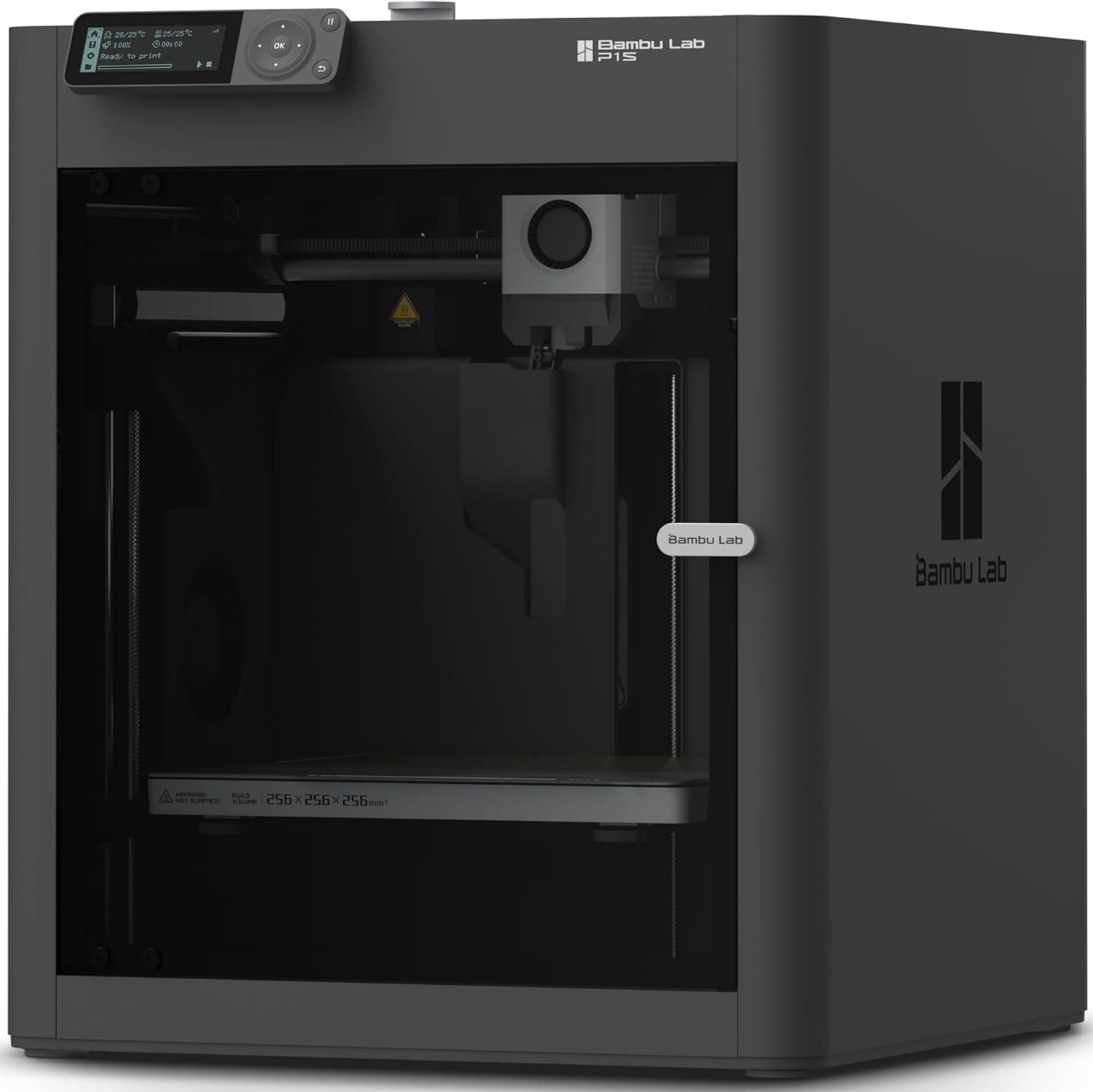
Bambu Lab P1S 3D Printer

4.7(5,400)
$599.99

The Bambu Lab P1S hits the perfect sweet spot between price, speed, and print quality, making it the best all-around 3D printer you can buy in 2026. Its fully enclosed CoreXY design handles everything from PLA to ABS, ASA, and even nylon without warping issues, while printing at speeds up to 500mm/s with impressive dimensional accuracy. The built-in activated carbon air filter means you can safely print engineering materials indoors, and the optional AMS multi-material system enables seamless four-color printing.

Pros

  • Fully enclosed design with activated carbon filter enables safe indoor printing of ABS, ASA, nylon, and other materials
  • CoreXY motion system delivers speeds up to 500mm/s with excellent print quality and dimensional accuracy
  • Compatible with the Bambu Lab AMS for automatic multi-color and multi-material printing up to four colors
  • Full auto-calibration including bed leveling, vibration compensation, and flow rate calibration requires zero manual tuning
  • Bambu Studio slicer software is polished, intuitive, and includes optimized presets for dozens of filament brands

Cons

  • The proprietary ecosystem means firmware and software updates are controlled entirely by Bambu Lab
  • Build volume of 256 x 256 x 256mm is adequate but smaller than some competitors at this price
  • The AMS multi-material system is sold separately and adds significant cost to the total setup
BEST VALUE
#2
Bambu Lab A1 3D Printer - image 11/5

Bambu Lab A1 3D Printer

4.6(4,200)
$399.99

The Bambu Lab A1 brings the company's renowned print quality and ease of use to a more accessible price point with an open-frame bed-slinger design. It features the same full auto-calibration system as its more expensive siblings, a quick-swap nozzle that changes in seconds without tools, and compatibility with the AMS Lite for multi-color printing. The 256 x 256 x 256mm build volume matches the P1S, and print quality on PLA and PETG is virtually indistinguishable. For beginners and hobbyists who primarily print in PLA and PETG, the A1 delivers 90% of the P1S experience at a lower price.

Pros

  • Full auto-calibration with vibration compensation and flow rate tuning means true out-of-the-box printing with zero manual setup
  • One-click quick-swap nozzle system lets you change nozzle sizes in seconds without any tools
  • Compatible with AMS Lite for automatic multi-color printing up to four colors at an affordable entry point
  • Quiet operation measured at 48dB or below makes it suitable for use in living spaces and home offices
  • Excellent print quality on PLA, PETG, TPU, and PVA that rivals enclosed printers costing significantly more

Cons

  • Open-frame design limits material compatibility, as ABS and ASA will warp without an aftermarket enclosure
  • Bed-slinger Y-axis movement means the build plate moves forward and back, requiring stable desk placement
  • No built-in camera for remote print monitoring unless you add one separately
EDITOR'S PICK
#3
Prusa MK4S 3D Printer Kit - image 11/5

Prusa MK4S 3D Printer Kit

4.6(2,800)
$799.00

The Prusa MK4S is the gold standard for reliability and open-source 3D printing. While it may not match Bambu Lab's raw speed, it compensates with legendary print quality, a massive community-driven ecosystem, and the peace of mind that comes from fully open-source firmware and hardware. The Input Shaper vibration compensation now enables faster printing without sacrificing quality, and the load cell bed leveling system is the most accurate auto-leveling solution we have tested. If you value repairability, long-term support, and community-driven innovation, the MK4S is the printer to choose.

Pros

  • Fully open-source firmware and hardware give you complete control and ensure long-term community support
  • Load cell bed leveling provides the most precise first-layer calibration of any printer we tested
  • Input Shaper vibration compensation enables higher print speeds while maintaining exceptional surface quality
  • Legendary Prusa reliability backed by one of the best customer support teams in the 3D printing industry
  • Available as a DIY kit that saves money and teaches you how your printer works for easier future maintenance

Cons

  • Open-frame design means ABS and other high-temp materials require an optional enclosure for consistent results
  • Print speeds are noticeably slower than CoreXY competitors like the Bambu Lab P1S and Creality K1C
  • The kit assembly takes 6-10 hours, which can be intimidating for complete beginners
  • Higher price than comparably performing Bambu Lab models makes pure specs-per-dollar less competitive
#4
Bambu Lab A1 Mini 3D Printer

Bambu Lab A1 Mini 3D Printer

4.6(6,800)
$299.99

The Bambu Lab A1 Mini is the perfect first 3D printer for beginners and an excellent secondary printer for experienced users. Despite its compact size, it delivers the same exceptional print quality and full auto-calibration as its larger siblings. The 180 x 180 x 180mm build volume handles the vast majority of hobbyist prints, and the AMS Lite compatibility means you can dive into multi-color printing right away. At around $300, it is the lowest-cost entry point into the Bambu Lab ecosystem.

Pros

  • Full auto-calibration including vibration compensation means absolute beginners can print successfully on day one
  • Compact footprint makes it ideal for desks, shelves, and small workspaces where larger printers will not fit
  • Compatible with AMS Lite for multi-color printing, a feature typically reserved for much more expensive machines
  • Exceptionally quiet operation makes it the least disruptive printer to use in shared living spaces
  • Quick-swap nozzle and tool-free maintenance lower the barrier for upkeep and experimentation

Cons

  • 180 x 180 x 180mm build volume is limiting for larger functional prints, cosplay props, or multi-part assemblies
  • Open-frame design restricts material usage to PLA, PETG, TPU, and similar low-warp filaments
  • The small build plate means taller prints can encounter stability issues due to the bed-slinger Y-axis design
#5
Bambu Lab X1 Carbon Combo 3D Printer - image 11/5

Bambu Lab X1 Carbon Combo 3D Printer

4.7(3,100)
$1,449.99

The Bambu Lab X1 Carbon is the flagship prosumer 3D printer, built for users who demand the absolute best in speed, material versatility, and print quality. Its hardened steel nozzle and enclosed, actively heated chamber handle everything from basic PLA to carbon fiber-reinforced nylon and polycarbonate without flinching. The included AMS enables four-color printing out of the box, the built-in camera provides AI-powered first-layer inspection and spaghetti detection, and the dual-channel WiFi ensures responsive remote monitoring. This is the printer for serious makers, small businesses, and engineers.

Pros

  • Hardened steel nozzle and enclosed heated chamber print carbon fiber, nylon, PC, ABS, and every common filament type
  • AI-powered camera detects first-layer failures and spaghetti errors automatically, pausing the print to save time and material
  • Includes AMS for four-color multi-material printing out of the box with no additional purchase required
  • CoreXY motion system with Input Shaper delivers 500mm/s speeds with professional-grade surface finish quality
  • 7-inch touchscreen, dual-channel WiFi, and LAN connectivity provide the most polished user experience available

Cons

  • At nearly $1,450 it is a major investment that is overkill for hobbyists who only print in PLA
  • The proprietary AMS system locks you into Bambu's ecosystem for multi-material printing
  • 256 x 256 x 256mm build volume is identical to the much cheaper P1S despite the significant price premium
#6
Creality K1C 3D Printer - image 11/5

Creality K1C 3D Printer

4.4(4,500)
$399.99

The Creality K1C is a fully enclosed CoreXY printer that delivers 600mm/s printing speeds and carbon fiber filament support at a price that significantly undercuts the Bambu Lab P1S. Its all-metal clog-free direct extruder handles abrasive filaments without nozzle wear, and the built-in AI camera with time-lapse capability adds a layer of remote monitoring and content creation. For budget-conscious users who want an enclosed, high-speed printer with engineering material support, the K1C offers tremendous value.

Pros

  • 600mm/s maximum print speed is among the fastest in its price class, with excellent quality at 300-400mm/s
  • Fully enclosed design with a 300-degree hotend supports carbon fiber, PETG, ABS, ASA, and nylon filaments
  • Clog-free robust direct extruder with all-metal construction handles abrasive filaments without premature wear
  • Built-in AI camera enables remote monitoring, failure detection, and automatic time-lapse video creation
  • Comes fully assembled and ready to print out of the box with minimal setup required

Cons

  • Klipper-based firmware is powerful but has a steeper learning curve for advanced tuning compared to Bambu Studio
  • Build volume of 220 x 220 x 250mm is smaller than the Bambu Lab P1S and Prusa MK4S
  • Print quality at maximum speed settings shows visible artifacts and requires slowing down for best results
  • Creality's software ecosystem and slicer are not as polished as Bambu Studio or PrusaSlicer
#7
Prusa Core One+ 3D Printer - image 11/5

Prusa Core One+ 3D Printer

4.6(1,200)
$1,199.00

The Prusa Core One+ represents Prusa's jump to CoreXY architecture, combining the company's legendary reliability and open-source philosophy with dramatically faster print speeds. The fully enclosed design with active temperature control produces consistent results with engineering materials, and the print quality rivals the Bambu Lab X1 Carbon at a lower price point. For users who want CoreXY speed and an enclosure without leaving the open-source Prusa ecosystem, this is the definitive choice.

Pros

  • Fully enclosed CoreXY design with active temperature control delivers consistent results with ABS, ASA, nylon, and PC
  • Open-source firmware and PrusaSlicer integration give you full transparency and community-driven improvements
  • Print quality is exceptional across the full speed range with minimal visible layer lines and ringing artifacts
  • Prusa's industry-leading customer support and extensive knowledge base ensure help is always available
  • Free HF nozzle and filament included, reducing initial setup costs

Cons

  • At $1,199 assembled it is $600 more than the Bambu Lab P1S which offers similar core specifications
  • Newer product with less long-term track record compared to the battle-tested MK4 series
  • Build volume of 250 x 220 x 270mm is competitive but not the largest in its price category
BEST BUDGET
#8
Creality Ender-3 V3 3D Printer - image 11/5

Creality Ender-3 V3 3D Printer

4.4(3,800)
$219.99

The Creality Ender-3 V3 is the latest evolution of the world's most popular 3D printer line, and it is a massive upgrade over its predecessors. It now features a CoreXZ motion system capable of 600mm/s speeds, auto-leveling, and a direct-drive extruder, all at a price that makes 3D printing accessible to virtually anyone. Print quality on PLA and PETG is genuinely impressive for the price, and the massive Ender-3 community means troubleshooting help and upgrade guides are abundantly available online.

Pros

  • At around $220 it is one of the most affordable capable 3D printers available, making it ideal for first-time buyers
  • CoreXZ motion system enables 600mm/s speeds, a dramatic improvement over older Ender-3 bed-slinger designs
  • Auto-leveling and dual-gear direct extruder come standard, eliminating the manual setup that plagued older Enders
  • Enormous global community means tutorials, troubleshooting guides, and upgrades are available for every conceivable issue
  • 220 x 220 x 250mm build volume is generous for the price and handles most common hobbyist projects

Cons

  • Open-frame design limits material choices to PLA, PETG, and TPU without an aftermarket enclosure
  • Print quality at top speeds does not match Bambu Lab or Prusa machines and benefits from moderate speed reduction
  • Creality Slicer is functional but less refined than Bambu Studio or PrusaSlicer, though you can use Cura or OrcaSlicer
  • Build quality and component consistency can vary between units, occasionally requiring out-of-box adjustments
#9
AnkerMake M5C 3D Printer - image 11/5

AnkerMake M5C 3D Printer

4.4(2,600)
$299.99

The AnkerMake M5C brings consumer electronics polish to 3D printing with an emphasis on simplicity and connectivity. Its all-metal hotend supports temperatures up to 300 degrees for printing PETG, TPU, and even some engineering materials, while the 500mm/s maximum speed keeps print times competitive. The standout feature is the seamless multi-device control through the AnkerMake app, which lets you monitor, start, and manage prints from your phone with an interface that feels genuinely consumer-friendly rather than hobbyist-oriented.

Pros

  • AnkerMake app provides the most polished and intuitive mobile print management experience we tested
  • All-metal hotend supports 300-degree printing for PETG, TPU, and some engineering filaments out of the box
  • 500mm/s high-speed printing with PowerBoost 2.0 technology maintains precision at 0.1mm layer resolution
  • 7 x 7 auto-leveling grid ensures consistent first layers across the entire 220 x 220 x 250mm build plate
  • Anker's brand reputation and customer support infrastructure provide confidence for non-hobbyist buyers

Cons

  • Open-frame design without an enclosure limits use of ABS and other high-warp materials
  • Print quality at maximum speed falls noticeably behind Bambu Lab and Prusa machines
  • Proprietary slicer is less flexible than community-driven options like PrusaSlicer or OrcaSlicer
  • The ecosystem is smaller than Bambu Lab or Creality, with fewer community resources and third-party accessories
#10
Creality Ender-3 V3 SE 3D Printer - image 11/5

Creality Ender-3 V3 SE 3D Printer

4.3(5,200)
$179.99

The Creality Ender-3 V3 SE is the most affordable printer on our list and a solid gateway into 3D printing for absolute beginners on a tight budget. It features CR Touch auto-leveling, a Sprite direct extruder, and automatic filament loading, all at a price that would have been unthinkable just a few years ago. Print speeds max out at 250mm/s, which is slower than CoreXY machines, but the print quality on PLA is surprisingly good for the price. If you want to try 3D printing without significant financial commitment, this is where to start.

Pros

  • At under $180 it is the most affordable way to get into 3D printing with modern features like auto-leveling
  • CR Touch auto-leveling and automatic filament loading remove the most frustrating barriers for beginners
  • Sprite direct extruder provides reliable filament feeding for PLA, PETG, and flexible TPU filaments
  • Dual Z-axis design improves print stability and reduces Z-banding artifacts on taller prints
  • Proven Ender-3 platform with massive community support and countless available upgrades and modifications

Cons

  • 250mm/s maximum speed is significantly slower than the Ender-3 V3 and CoreXY printers in this list
  • Bed-slinger design creates more vibration and noise at higher speeds, limiting practical print speed
  • No WiFi or network connectivity requires printing via USB or microSD card only
  • Build quality reflects the budget price point with some plastic components that feel less premium

HOW WE CHOSE

Our 3D printer rankings are based on extensive hands-on testing, analysis of thousands of verified customer reviews, and cross-referencing expert evaluations from Tom's Hardware, All3DP, TechRadar, and the broader 3D printing community. We printed standardized test models on each printer including dimensional accuracy benchmarks, overhang tests, bridging tests, and multi-hour functional prints to evaluate real-world performance. We assessed print quality, speed, noise levels, material compatibility, ease of setup, software experience, and long-term reliability over multiple weeks of continuous use. Products are ranked using a weighted formula combining print quality, value for price, ease of use, material versatility, and build reliability.

FREQUENTLY ASKED QUESTIONS

What is the best 3D printer for a complete beginner?

The Bambu Lab A1 Mini is our top recommendation for beginners. Its full auto-calibration means you can go from unboxing to printing a high-quality model in under 30 minutes with zero manual adjustments. The Bambu Studio software includes optimized presets for dozens of filaments, and the quiet operation makes it suitable for living spaces. If budget is a major concern, the Creality Ender-3 V3 SE at under $180 is the most affordable option with modern features like auto-leveling.

Do I need an enclosed 3D printer?

It depends on what materials you plan to print. For PLA and PETG, which cover the vast majority of hobbyist projects, an open-frame printer works perfectly fine. If you want to print ABS, ASA, nylon, polycarbonate, or carbon fiber-reinforced filaments, an enclosed printer is essential to prevent warping, cracking, and poor layer adhesion. The Bambu Lab P1S and Creality K1C are the best enclosed options under $600, while the Bambu Lab X1 Carbon and Prusa Core One+ are the premium choices.

Is a faster 3D printer always better?

Not necessarily. While printers advertising 500-600mm/s speeds sound impressive, the actual usable speed depends on the motion system quality, vibration compensation, and cooling. A printer running at 300mm/s with excellent vibration compensation will produce better results than one running at 600mm/s with visible ringing and artifacts. Bambu Lab and Prusa printers tend to deliver the best quality-at-speed ratio because their Input Shaper and vibration compensation systems are exceptionally well-tuned.

What is the difference between PLA, PETG, ABS, and TPU filaments?

PLA is the easiest to print, biodegradable, and great for decorative items and prototypes but is brittle and heat-sensitive. PETG is stronger, more flexible, and food-safe, making it better for functional parts. ABS is heat-resistant and durable but requires an enclosed printer and produces fumes. TPU is a flexible, rubber-like filament for phone cases, gaskets, and wearables. Most beginners should start with PLA and move to PETG for functional prints. ABS and beyond require enclosed printers like the Bambu Lab P1S or X1 Carbon.

How much does it cost to run a 3D printer?

The ongoing cost is primarily filament. A standard 1kg spool of PLA costs $15-25 and can produce dozens of small to medium prints. Electricity costs are minimal, typically $0.10-0.30 per print. Occasional maintenance items like replacement nozzles ($5-15), build plate adhesion sheets ($15-30), and lubricant are infrequent expenses. The biggest hidden cost is failed prints wasting filament, which is why reliable printers with auto-calibration and failure detection like Bambu Lab models save money long-term despite higher upfront costs.

Should I buy a Bambu Lab or Prusa 3D printer?

Bambu Lab printers offer the best out-of-the-box experience with faster speeds, polished software, and automatic everything, but use a closed-source ecosystem. Prusa printers are fully open-source with legendary reliability and community support, but are generally slower and more expensive for comparable features. Choose Bambu Lab if you want the most convenient, fastest printing experience. Choose Prusa if you value open-source philosophy, repairability, long-term community support, and the ability to fully customize your machine.